
Pet Christmas Card Before And After AI Examples
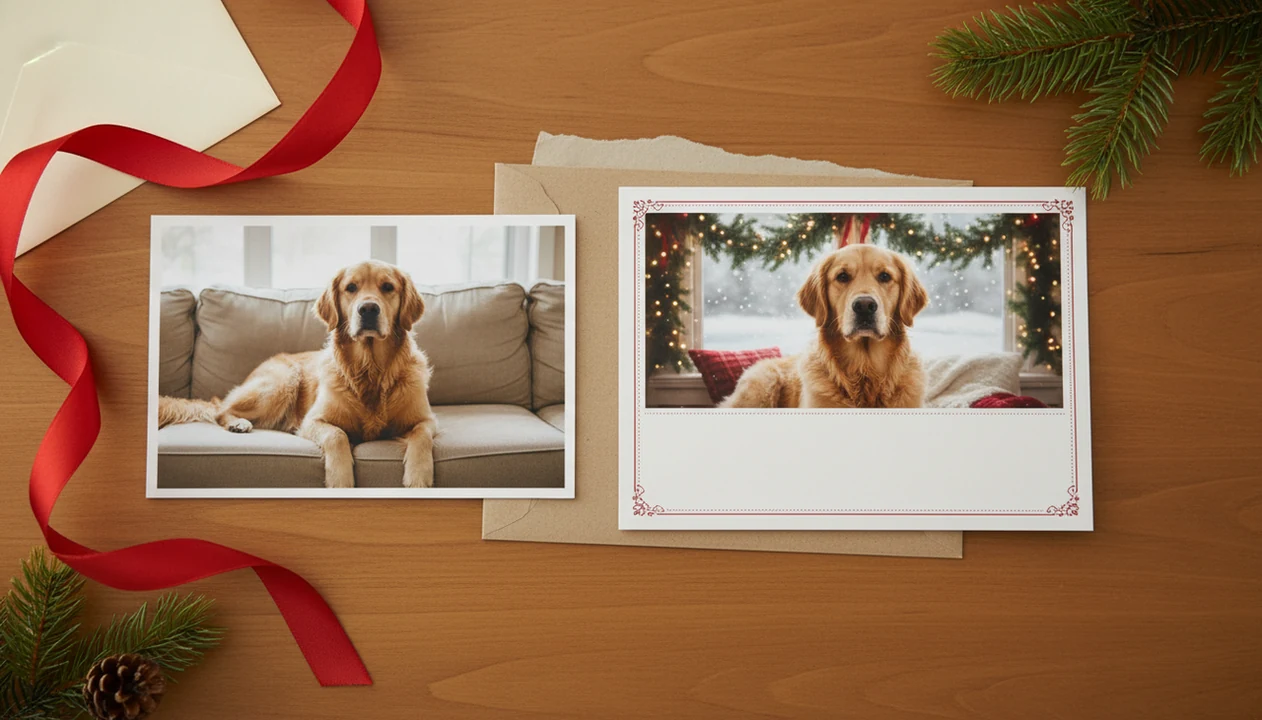
A pet Christmas card before and after shows how a plain dog or cat photo can become a festive printable or digital holiday card when the pet is cleaned up, reframed, styled, and placed into a Christmas layout. The best results usually start with a sharp, well-lit phone photo where the pet’s face, eyes, ears, and markings are easy to see.
> Definition:
- Clear pet faces, natural light, and simple backgrounds create the most realistic pet AI card results.
- Upload-based AI card tools are better than text-only generators when the card needs to look like your real dog or cat.
- Print-ready after images still need the right crop, bleed, resolution, and text placement before mailing.
Pet Christmas Card Before And After Results At A Glance
A pet Christmas card before and after compares the original pet photo with the finished holiday card design. The “before” is usually a phone snapshot; the “after” is the styled card with cleaner framing, festive background, adjusted light, and greeting text.
The important part is recognition. Your dog should still look like your dog, not a similar golden retriever in a scarf. Your cat’s face, ears, eye color, and markings should remain believable even if the background changes to snow, garland, or a fireplace scene.
Most pet owners start with everyday phone photos because that is where the good moments live. Pew Research Center reports that smartphone ownership is widespread among U.S. adults, which helps explain why most pet-card projects start in the camera roll rather than a studio folder (https://www.pewresearch.org/internet/fact-sheet/mobile/). That explains the thumb-stopped camera roll scrolling at 9:47 p.m., looking for one frame where the dog nose is not in the foreground.
Start with the photo you already have, then check the crop.
How Pet Christmas Card AI Before And After Editing Works
Upload-based pet Christmas card AI works by using your original pet photo as the visual reference, then changing the scene, style, and layout around that pet. Text-only generation starts from a written prompt, so it is more likely to create a look-alike animal instead of preserving your actual dog or cat.
In plain terms, the system first identifies the subject. It looks for the pet’s face, outline, ears, fur texture, and contrast against the background. Then it may replace the background, apply style transfer, adjust lighting, and place the result into a card composition with margins and text.
The technical pieces are often called subject detection and image embeddings. The simple version: the app tries to understand what makes your pet visually distinct.
Upload-based tools usually preserve markings better because they can “see” the real source image. Text-only tools can guess “black-and-white tuxedo cat,” but they do not know the exact white patch under the chin. Generative AI investment is also accelerating these creative workflows; Grand View Research projects continued generative AI market growth through 2030, including image and media use cases (https://www.grandviewresearch.com/industry-analysis/generative-ai-market-report).
Pet AI Card Results Method: Photo Conditions We Compared
Pet AI card results are easiest to compare when the same pet is tested under different source-photo conditions. The goal is not to promise identical results. It is to show which inputs usually create cleaner, more recognizable Christmas card after images.
- Distance from camera: Close portraits kept more facial detail than full-room photos where the pet filled only a small part of the frame.
- Eye-level angle: Photos taken near the pet’s eye line gave better face shape than overhead shots from adult standing height.
- Window light versus overhead light: Window light reduced harsh shadows and helped avoid yellow living-room light on fur.
- Cluttered versus plain backgrounds: Simple floors, blankets, or walls made cleaner AI cutouts than toy piles and chair legs.
- Sharp versus blurry faces: Sharp eyes and noses worked better than motion blur, especially with whiskers, ears, and patterned fur.
Cats and dogs behave differently in edits. A fluffy tail, folded ears, long whiskers, or dark eyes can change how cleanly the model separates the pet from the room.
Dog Card Before After Example: Couch Snapshot To Cozy Christmas Card
Does a couch photo work for a dog card before after result? Yes, if the dog’s face is sharp, the ears are visible, and the dog stands apart from the couch color.
The before photo in this example is the ordinary kind: a living-room snapshot with a blanket behind the dog, a collar tag catching light, and one paw half-tucked under the body. Not a studio pose. Just a decent phone photo taken before the dog moved.
The after image works when the background is cleaned, the light turns warmer, and the card adds garland, soft snow, or a simple mantel scene. Readable greeting text matters more than another decoration. Good Christmas card maker and holiday greeting guides that help families turn phone photos into printable cards, digital greetings, and festive portraits using ai styles deliver practical finishing checks, not a guarantee that every couch snapshot becomes a catalog portrait.
Check paws, collar edges, sweater seams, and the crop around ears before exporting.
Cat Pet Christmas Card Before And After Example: Window Light To Vintage Postcard
Can a window-light cat photo become a vintage Christmas postcard? It often can, especially when the cat’s eyes, whiskers, and face are sharp in the before image.
The before photo might show a cat sitting near a window with a plain curtain or wall behind it. That setup gives the model clean boundaries and small catchlights in the eyes. Those bright eye reflections help the after image feel alive instead of flat.
For the after result, a vintage postcard style can add muted reds, cream paper texture, painted greenery, and serif greeting text. The cat can look illustrated while still keeping its real face shape. For cat owners who want a simple upload flow, a pet Christmas card maker is often easier than rebuilding the layout in a general design tool.
Patterned fur needs care. If the source image is too small or dark, tabby stripes, calico patches, and white socks can drift or blur.
Personalized Pet Christmas Card Before And After Style Comparisons
Different AI styles can make the same pet photo feel formal, funny, or nostalgic. Realistic styles usually preserve pet identity better; playful styles can be more shareable but less exact.
| Style | What changes in the after image | Identity preservation | Good use |
|---|---|---|---|
| Realistic photo | Cleaner light, festive room, sharper card crop | High | Printable mailed cards |
| Cartoon | Bigger eyes, simplified fur, brighter colors | Medium | Digital greetings and kids’ cards |
| Oil painting | Brush texture, soft shadows, classic portrait mood | Medium | Framed-looking holiday cards |
| Vintage postcard | Paper grain, muted color, old-card typography | Medium-high | Nostalgic family greetings |
| Funny Santa style | Hat, beard, props, comic scene | Low-medium | Text messages and social posts |
For printable cards, choose the style that keeps the pet most recognizable at postcard size. For digital greetings, you can push the joke further because people will view it close up.
Repeated presets can make cards look alike. Change the wording, crop, background, or layout so the after image feels like your household, not the same sample everyone saved.
How To Use A Pet Christmas Card Before And After Workflow
A good pet Christmas card workflow moves from source photo to AI style to print check. Tools like a Christmas card app, Canva, and Picsart can help, but the same review steps still apply before you mail or share the card.
In a Christmas card app, PiXmas Cards use the uploaded pet photo as the reference image, so the workflow is built around preserving the real dog or cat first and styling the Christmas layout second. That makes the side-by-side before-and-after check more important than the prompt alone.
- Choose a sharp phone photo where the pet’s eyes, ears, nose, and markings are visible.
- Upload the image into an AI card or photo-editing tool that uses the actual pet photo as a reference.
- Test two or three styles, such as realistic photo, vintage postcard, and funny Santa, before choosing one.
- Check pet identity by comparing the before and after side by side, especially the face, paws, tail, and fur pattern.
- Edit the greeting text so it fits the card without covering ears, whiskers, or collars.
- Export the highest-quality file available for print, or save a digital version for family-safe sharing.
At the kitchen table, this is where final-final-card.pdf appears in the Downloads folder. Save a backup before you keep changing it.
Print-Ready Pet AI Card Results: Crops, DPI, And Bleed
Print-ready pet AI card results need more than a cute after image. The file must have enough resolution, the crop must fit the card size, and the text needs breathing room away from trim edges.
- High-resolution source photos matter: A tiny or heavily cropped before image can look fine on a phone but soft after printing.
- 300 dpi is the usual print target: For mailed cards, export near 300 dpi at the final card dimensions when the app allows it.
- Aspect ratio affects the crop: A square AI image may lose ears or tails when placed on a 5x7 card.
- Bleed and safe zones prevent trimming surprises: Keep names and greetings away from the edge, especially on home inkjet trays that pull cardstock slightly crooked.
- Compressed exports can reduce quality: Save the highest-quality file available, not just the quick share preview.
For rushed mailing windows, a last minute Christmas card maker still needs one final print preview under normal room light.
Common Pet Christmas Card Before And After Patterns
Strong pet Christmas card before and after examples usually come from the same few source-photo traits. They are not random. The before photo gives the AI enough clean information to preserve the pet while changing the card setting.
Clear face. Sharp eyes, nose, and mouth give the after image a better chance of looking like the same pet.
Eye-level angle. A photo taken near the pet’s height feels more portrait-like than a steep top-down angle.
Natural light. Window light keeps fur color more believable than dim overhead light or one red-eye flash.
Simple background. A plain couch, rug, wall, or doorway is easier to separate than wrapping paper, slippers, and table legs.
Visible markings. Distinct spots, stripes, socks, and muzzle colors help identity survive the style change.
Weak inputs include motion blur, dark rooms, heavy clutter, cut-off ears, and backgrounds close to the pet’s fur color. In the United States, 66% of households own a pet, according to AVMA pet ownership statistics (https://www.avma.org/resources-tools/reports-statistics/us-pet-ownership-statistics), and Pew Research Center has reported that most Americans celebrate Christmas in some form (https://www.pewresearch.org/religion/2017/12/12/most-americans-celebrate-christmas-but-fewer-think-of-it-as-a-religious-holiday/). That is why casual pet photos so often become family holiday greetings.
What Pet Christmas Card Before And After Examples Do Not Prove
One polished pet Christmas card before and after example does not prove every pet photo will work. A clean sample can show what is possible, but it cannot guarantee the same result from a dark hallway photo or a frame where the cat is mid-blink.
Exact facial matching may take several generations, prompt changes, or a different style. A realistic photo style might keep the muzzle right, while a funny Santa style changes the eyes or rounds the ears. That can be fine for a joke card, but not for a memorial card or a pet everyone knows well.
Emotional impact is also personal. People may love a pet holiday card because it feels warm, but strong peer-reviewed evidence does not prove one style is more meaningful than another.
Some prompts may be refused or changed. Copyrighted characters, unsafe costume ideas, or policy-conflicting requests can lead to substitutions. Annoying, but expected.
Limitations
AI pet card transformations can be useful, but they still need human checking. Before you print, compare the before and after at full size.
- Blurry, dark, or very small source images often produce unrealistic pet AI card results.
- Identity drift can make the after image look like a similar dog or cat instead of your real pet.
- Paws, leashes, whiskers, sweaters, collars, teeth, and tags are common glitch spots.
- Background replacement may fail when the pet blends into a couch, carpet, blanket, or shadow.
- Low-resolution exports, app compression, or screenshot-based saving can hurt print quality.
- Crops can remove ears, tails, paws, or greeting text if the design is forced into a new aspect ratio.
- Copyrighted characters, unsafe costume prompts, or policy-conflicting scenes may be refused, softened, or replaced.
- A printable version may still need a local kiosk or printer adjustment; Walgreens, CVS, and home printers do not all trim the same way.
For families making people-and-pet cards together, a family Christmas card app workflow may be simpler than editing each image separately.
FAQ
What photo works best for a pet Christmas card before and after?
A sharp, well-lit, eye-level photo with the pet’s face and markings visible usually works best. A simple background also helps the AI separate the pet cleanly.
Can AI keep my pet’s face the same in a Christmas card?
Upload-based tools usually preserve pet identity better than text-only generators. Exact matching is not guaranteed, especially in heavily stylized results.
Are blurry pet photos usable for AI Christmas cards?
Mildly soft photos may work for cartoon or painted styles. Dark, motion-blurred images often create distorted faces, paws, or fur patterns.
What size should I export for a printable pet Christmas card?
Use the highest-resolution export available and aim for print-ready dimensions at about 300 dpi. Check the final crop before sending it to print.
Do cat photos work as well as dog photos for AI Christmas cards?
Cat photos can work well when eyes, whiskers, ears, and fur markings are clear. Dark fur and low light can make identity preservation harder.
Can I make a funny dog Christmas card with AI?
Yes, funny dog Christmas card styles can work well for digital greetings. Check props, costumes, paws, and teeth before printing.
Are AI pet Christmas cards good enough to print and mail?
They can be printable if the final file has enough resolution, correct crop, bleed, and safe text placement. Always preview the finished card at print size.
Why did my pet look different in the AI after image?
Your pet may look different because of a weak source photo, aggressive style, text-only generation, or repeated AI variation. Try a sharper upload and a less stylized preset.
What Pet Christmas Card Before-and-After Results Cannot Predict for Your Photo
A pet Christmas card before-and-after example does not prove that your own photo will preserve the same facial features, fur markings, pose, or level of detail. Each comparison reflects one source image, crop, prompt, style, and selected output; it cannot isolate which factor produced the improvement. A clean result made from a front-facing dog photo is especially weak evidence for a side-view cat, a black pet against a dark background, or an image with clothing covering the ears. There is no reliable universal success rate for matching a pet from these examples alone. Use them to judge the type of transformation, then test your actual image and inspect the eyes, muzzle, ear shape, coat pattern, paws, collar, and any text before choosing a final card.
Relighting Can Hide Facial Changes in Pet Christmas Card Before-and-After Images
61% of respondents preferred printed holiday cards (VistaPrint, 2024), making it important to inspect whether a pet’s face still looks natural after dramatic relighting. This preference does not show that AI preserves identity or that the displayed transformation came from a weak original. In pet Christmas card examples, brighter eyes, smoother fur, and warmer shadows can make an after image feel more successful while concealing altered eye spacing, muzzle contours, ear edges, or coat markings. To evaluate the comparison, inspect both images at matching facial scale, then separate lighting improvements from structural changes. Catchlights and lifted shadows may improve readability; a different nose shape or shifted markings indicate the edit changed the pet, not merely the scene.