
Business Holiday Card Before And After Team Photo Examples
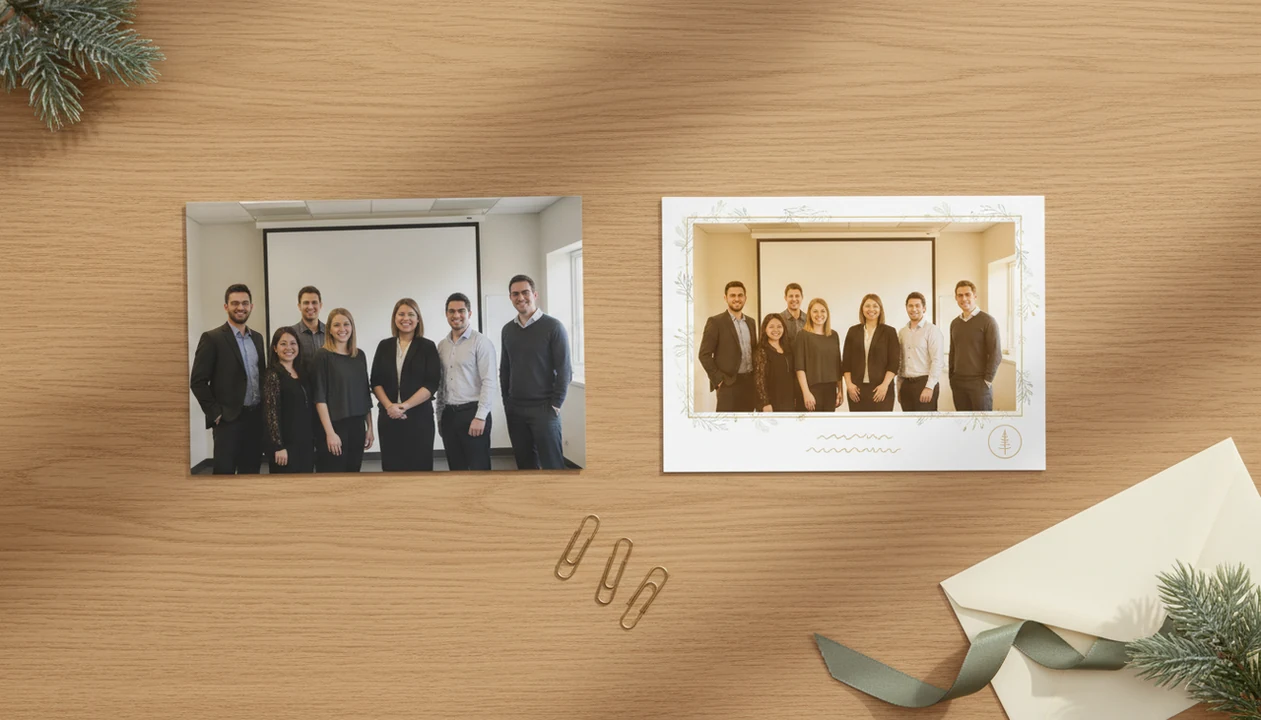
A business holiday card before and after shows how a plain team photo becomes a polished client-ready greeting with better cropping, light cleanup, festive styling, logo placement, and a short gratitude message. The strongest results keep the team recognizable, the branding subtle, and the holiday wording inclusive.
> A business holiday card maker should turn one clear team photo into a polished print or digital greeting without making the team look fake, over-branded, or hard to recognize.
- Start with a clear, well-lit team photo because the finished card can only improve what the original image gives it.
- The best after cards feel warm and professional, not like an advertisement or sales flyer.
- Create both print-ready and digital versions so clients, employees, and partners can receive the greeting in the format they prefer.
4 business holiday card before and after examples at a glance
A business holiday card before and after compares the original team photo, office snapshot, or phone photo with the finished branded card for print, email, or social sharing. The useful comparison shows the same people, not a random inspiration card.
The “before” might be a lobby photo with uneven ceiling light, a conference-room wall, and one person half a step behind the group. The “after” usually improves the crop, cleans up background distractions, adds a festive border or AI style, places the logo, matches company colors, and adds greeting text.
Cards work best when they feel like a relationship note. In a 2021 VistaPrint survey, 76% of U.S. small business owners who send business holiday cards said they believe those cards help build better customer relationships (https://www.vistaprint.com/hub/business-holiday-cards-survey).
The card is a hello, not a pitch.
4-point method for tracking team photo card results
A credible before-and-after review compares the same source image against the finished card, not an unrelated design mockup. That keeps the result honest and helps you judge what changed.
Use four checkpoints: source photo quality, edit choices, message and branding, and export format. We judge team photo card results by recognizability, warmth, professionalism, and whether the file is usable for print or digital delivery. A sharp phone photo with yellow office light can often be improved. A blurry group shot from across the room has a harder ceiling.
For small teams, the full process is easier to copy when you start with a real business holiday card from team photo workflow instead of a mood board.
Source photo checkpoint
Check faces, light, spacing, background clutter, and empty room for text.
Finished card checkpoint
Check the crop, greeting, logo size, file type, and whether everyone still looks like themselves.
Office snapshot to client greeting business holiday card example
Can an office snapshot become a client-ready holiday card? Yes, if the source photo is clear enough and the final design keeps the business tone warm instead of sales-heavy.
Before: the team stands in a lobby near a reception desk. The lighting is uneven, a coat rack sits in the corner, and the spacing feels casual. One person is closer to the camera than everyone else. It looks fine for Slack, but not finished for clients.
After: the crop tightens around the group, exposure warms slightly, and the background softens. A simple border frames the team. The logo sits small near the bottom with a line like, “Happy Holidays from our team to yours.”
Subtle branding works because the recipient sees people first. Inclusive wording is safer for clients, vendors, and mixed-audience mailing lists, especially when you don’t know every recipient’s holiday traditions.
Phone image to polished print file team photo card results
- A good before photo can be a phone image with decent light, real expressions, and imperfect framing.
- The after card should correct the crop, even out color, add holiday texture, and keep safe margins around faces.
- Logos should sit away from heads, hands, and trim edges.
- Blurry originals, tiny screenshots, and heavy zooms often print poorly.
- The U.S. Postal Service reported more than 1.3 billion holiday cards, letters, and parcels processed between Thanksgiving and New Year’s Day during the 2022 peak season (https://about.usps.com/newsroom/national-releases/2022/1205-usps-ready-to-deliver-for-america-during-the-holidays.htm), so mailed greetings still move at real scale.
A team photo taken at 4:20 p.m. near a front window can become a print-ready file if no face is soft. Leave room for the greeting before you pick the card shape. For print, the most reliable business holiday card result starts with a sharp photo, visible faces, safe margins, and a high-resolution export.
Print crop and safe margin
Keep important faces away from trim edges. Home inkjet trays and local kiosks can shift cardstock slightly.
Logo and message placement
Put the logo below or beside the photo, not across someone’s jacket or face.
Business holiday card before and after email greeting example
A team photo that feels too plain for an email header can become a landscape digital greeting with festive styling, short copy, and a gentle company signature. Email versions should be lighter, clearer, and less text-heavy than print cards.
| Element | Before email image | After email greeting |
|---|---|---|
| Photo shape | Vertical office photo | Landscape crop for inbox preview |
| Text | No greeting or too much copy | One short gratitude line |
| Branding | Logo missing or oversized | Small signature near the bottom |
| Mobile view | Faces too small | Larger crop, readable type |
| File prep | Heavy image file | Compressed image or linked version |
Personalization helps when it is sincere. A 2023 McKinsey report found that 71% of consumers expect personalized interactions from companies, and 76% get frustrated when personalization is missing (https://www.mckinsey.com/capabilities/growth-marketing-and-sales/our-insights/the-value-of-getting-personalization-right-or-wrong-is-multiplying).
For client lists, segment by audience when possible. “Thank you for partnering with us this year” reads better than a generic blast.
How business holiday card before and after transformations work
Business holiday card transformations work by assessing the source image, improving composition, applying a seasonal layout, adding restrained branding, and exporting the file for its delivery channel. The technical pieces are simple: crop geometry, exposure correction, background handling, template layering, and output resolution.
Image cleanup and composition
Start by checking the photo for face clarity, color cast, distracting objects, and empty space for text. Tools can improve lighting consistency, soften the background, and make the image feel less like a quick office snapshot. They should not change identities, over-retouch faces, invent staff who were not present, or hide severe blur.
Holiday style and export
Holiday card makers and greeting guides should deliver printable cards, digital greetings, and festive portraits using AI styles, not fake staff photos or misleading brand claims. Tools like a Christmas card app can help turn one team photo into printable cards and digital greetings, but the team still needs to review names, faces, logo placement, and final export settings.
6-step process for using business holiday card examples with your team
Use business holiday card examples as a checklist, not as a script. The goal is to copy the decision pattern: better photo, cleaner crop, warmer message, usable export.
- Choose the clearest team photo with open eyes, natural expressions, and enough empty space for text.
- Select a format for print, email, or social sharing before you place the greeting.
- Apply a restrained holiday style, such as a snowy border, warm lights, or illustrated office background.
- Add a short inclusive message and a small logo that does not compete with faces.
- Review identity accuracy, spelling, skin tone, uniforms, badges, and any AI-made details.
- Export a high-resolution print file and a lighter digital version, ideally by late November or early December.
If you’re comparing tools, a business Christmas card app should make these steps clear before you commit to a final file.
5 professional business holiday card patterns
Strong business holiday cards repeat a few patterns: they prioritize gratitude, relationships, and togetherness before branding. Pew Research Center found in 2021 that 91% of U.S. adults looked forward to the holidays because they are a time to spend with family and friends.
- Warm team portrait. The team stays recognizable, with warmer light and a simple greeting.
- Snowy branded border. Company colors appear in the frame, not across faces.
- Office-to-illustration style. The office photo becomes a soft illustrated scene while preserving the people.
- Minimal logo card. The logo sits small, often below “Season’s Greetings.”
- Client appreciation layout. The message thanks clients or partners without adding an offer code.
Printed cards can also carry credibility. A 2020 Royal Mail MarketReach study found that 87% of people consider mail such as greeting cards believable, and 70% said mail gives them a better impression of the sender.
Hidden work behind business holiday card before and after images
A polished after image rarely shows the rejected photos, message revisions, print proofing, or stakeholder review behind it. That hidden work matters.
Someone usually picked between ten similar team shots. Someone checked whether the gold script was readable on a phone. Someone noticed the logo was too close to a face. Then a test print may have landed on the counter looking darker than the screen version.
Before-and-after galleries can make the work look easier than it is, especially when the original team photo was unusually strong. The after card supports a relationship, but it cannot replace good service, a clear thank-you email, or direct client communication during the year.
Order or send one sample first. A single proof can catch muddy color, tight trim, or a greeting that sounded warmer in the draft than it looks in print. For tool selection, the best Christmas card app for small business is usually the one that lets your team proof both print and digital versions before bulk sending.
Limitations
Business holiday card before-and-after examples are useful, but they have real limits.
- A blurry, low-resolution, or poorly lit team photo may still look weak after editing.
- AI styling can over-smooth faces, change small details, or make staff look less authentic.
- Heavy branding, discount language, and sales copy can make the card feel like an advertisement.
- Religious imagery or wording may not fit every client, employee, vendor, or partner audience.
- Print results depend on resolution, bleed, trim, paper stock, and color handling, not only the design.
- Digital greetings may be ignored if the subject line is vague, the file is too large, or the text is hard to read on mobile.
- Holiday cards cannot repair damaged relationships, poor customer experience, or missed communication throughout the year.
- A before-and-after result from one strong photo does not guarantee the same result from every office snapshot.
Keep the promise modest. The card should say thank you, look professional, and arrive in a usable format.
FAQ
What is a business holiday card?
A business holiday card is a professional seasonal greeting sent to clients, employees, vendors, or partners. It usually includes a short message of thanks, subtle branding, and either a team photo or seasonal design.
Can I use a phone photo for a business holiday card?
Yes, a phone photo can work if it is sharp, well lit, and has enough room for cropping and text. Avoid screenshots, heavy zooms, harsh flash, and photos where faces are too small.
Should a business holiday card include our company logo?
A business holiday card can include a logo, but it should be small and secondary to the greeting. Place it away from faces and keep the message focused on appreciation.
What message should we put on a client holiday card?
Use short, inclusive wording such as “Happy Holidays from our team to yours” or “Thank you for your partnership this year.” Avoid long sales copy or religious wording unless it clearly fits your audience.
Are printed business holiday cards still useful?
Printed business holiday cards can still feel personal because they arrive as a physical item instead of another inbox message. They work best when the design is polished and the mailing list is current.
When should businesses send holiday cards?
Businesses should start print planning in November and aim to mail cards by late November or early December when possible. Digital greetings can go later, but they still need mobile testing.
Can AI edit our team photo for a holiday card?
AI can help with styling, background treatment, lighting consistency, and layout speed. It should not change staff identities, reshape faces heavily, or create a misleading team appearance.
What makes the after version of a business holiday card better?
The after version is better when it has a cleaner crop, clearer faces, warmer color, readable text, subtle branding, and the right export format. A polished card still depends on a usable source photo.
What Business Holiday Card Before-and-After Team Photos Should Never Sell or Imply
A business holiday card before-and-after team photo should never sell a service, promise results, or imply that the edited scene documents something that did not happen. Keep the transformation focused on presentation: crop distractions, balance lighting, simplify the background, and place the greeting without changing who attended or what the team represents.
- Do not turn the card into a disguised promotion with prices, offers, urgency, or sales claims.
- Do not imply client endorsement, charitable participation, awards, office locations, or team growth unless each claim is accurate and approved.
- Do not add people, replace faces, fabricate branded uniforms, or alter visible identities to suggest a different workforce.
- Do not label a staged or AI-generated scene as a candid office moment.
There is no universal numerical limit for acceptable retouching; the practical boundary is whether a recipient could draw a materially false conclusion from the after image.
Before-and-after team photo examples can hide lighting and face-editing limits
Business holiday card before-and-after examples often hide uneven source lighting, face-level retouching, and the compromises needed to make a team look consistent.
- Brightening a dim face cannot recreate detail lost to blur, clipped highlights, or deep shadow; the after image may look cleaner while retaining soft features.
- Color matching can reduce mixed fluorescent, window, and flash casts, but skin tones may still differ when employees were photographed in separate locations.
- Eye direction, blinking, glare on glasses, and overlapping faces usually require selecting another frame or compositing, not a simple lighting adjustment.
- Strong smoothing can erase freckles, skin texture, facial lines, or makeup, making colleagues less recognizable.
- A dramatic background replacement may disguise halos around hair, translucent eyeglass edges, or inconsistent shadows near shoulders.