
Discover Christmas Card Layout Ideas For One Photo
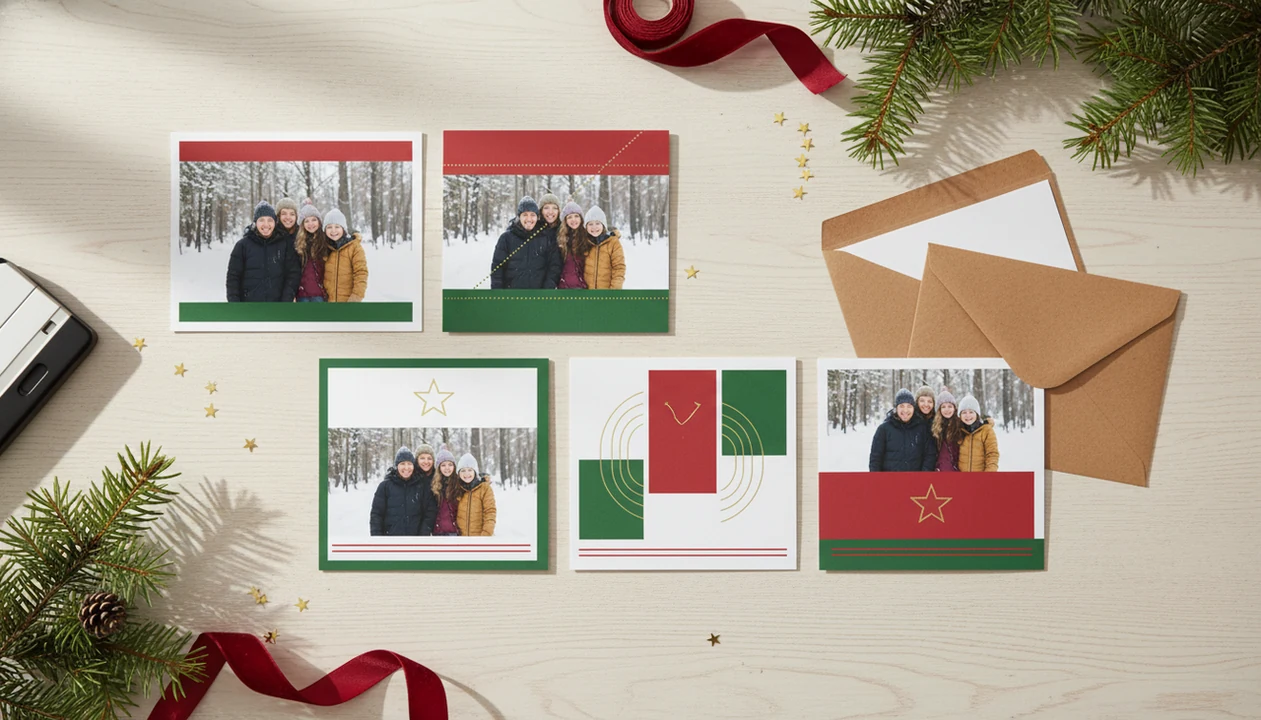
The easiest way to discover Christmas card layout ideas is to start with your photo orientation, choose one clear message, then test layouts that keep faces, text, and trimming margins safe. A single phone photo can become a polished printable card, digital greeting, family card, couple card, pet card, or small business holiday card when the layout matches the image.
- Start with the photo shape: portrait, landscape, square, close-up, or wide group shot.
- Use one main greeting, one supporting line, and colors pulled from the photo.
- Review cropping, text contrast, safe margins, and spelling before printing or sending.
Christmas Card Layout Ideas At A Glance
Christmas card layouts work best when the layout is chosen for the actual photo, not for the prettiest sample in a gallery. Start with the photo shape, then decide where the greeting can sit without fighting the faces.
| Layout type | Use it when | Watch for |
|---|---|---|
| Full-bleed single photo | The portrait or family shot is sharp, centered, and uncluttered | Faces and text too close to trim edges |
| Framed photo | You need safer printing and more room for names or the year | Borders that feel too heavy |
| Split layout | The photo works on one side and the message needs its own panel | Uneven balance between image and text |
| Minimal overlay | You are sending a modern digital greeting | Low contrast on busy backgrounds |
| Collage style | You have several strong photos | One great photo getting buried |
For one strong phone photo, a framed or split layout is often easier than a collage because it protects the image and gives the greeting a clear home.
Template-first services such as Canva, Shutterfly, and Minted can be useful for browsing polished examples, but they still require you to test whether your actual photo has enough safe space for faces, greetings, and trim margins.
How Christmas Card Layouts Work From One Phone Photo
A one-photo Christmas card layout is the arrangement of the image, greeting, names, date, border, and decorative details around the strongest visual subject. The layout starts by reading photo orientation, subject placement, background space, and face location.
In plain terms, the card should bend around the photo. A toddler looking left in yellow living-room light needs a different layout than a centered outdoor family portrait. Design tools may use image embeddings, which are numerical summaries of what appears in the photo, to suggest crops or styles. That sounds technical, but the job is simple: keep faces safe and make the words readable.
Good Christmas card maker and holiday greeting guides that help families turn phone photos into printable cards, digital greetings, and festive portraits using ai styles deliver practical layout choices, not a promise that every snapshot will print beautifully. AI-assisted tools can suggest crops, styles, and text placement, but you still need to check the crop.
How To Use Photo Card Layout Ideas In a Christmas card app
Use photo card layout ideas by moving from photo choice to output choice, then to text checks. Tools like a Christmas card app can help generate layout directions from one image, but the final review should still be yours.
- Upload one clear phone photo with enough light, resolution, and visible faces.
- Choose the intended output, such as printable card, digital greeting, family card, pet card, couple card, or business card.
- Pick or generate layout styles that fit the photo orientation instead of forcing a square photo into a wide card.
- Edit the greeting text, names, year, colors, and spacing so the card sounds like you.
- Review the crop, safe margins, contrast, and spelling before downloading or sending.
The 9:47 p.m. kitchen-table card session is real. Phone battery at 18%, one usable photo, and a PDF later named final-final-card.pdf. Save a backup before you send anything to print.
Method For Matching Christmas Card Layouts To Photo Shape
The fastest method is to match the layout to the photo’s shape first, then adjust the text placement. Photo card layout ideas fail when they ignore orientation.
- Portrait photos work well with stacked greetings, bottom captions, or tall framed cards.
- Landscape photos work well with full-width family scenes, side text panels, or cinematic borders.
- Square photos work well with centered frames, wreath borders, and symmetrical cards.
- Off-center subjects often need negative space for typography.
- Centered close-ups need text outside the photo or in a quiet border area.
If your photo has a dog leash in the corner, do not choose a layout that highlights that edge. Use a frame, crop slightly, or place a darker border there. For parent-specific workflows, a Christmas card app for parents can be useful when speed matters more than browsing hundreds of templates.
Family Christmas Card Layout Ideas From One Portrait
Family Christmas card layout ideas usually work best when the card respects the faces first. If everyone is centered and sharp, choose a full-bleed layout for impact or a framed layout for safer printing.
Best family layout structure
Place “Merry Christmas,” “Happy Holidays,” or the family name in open background space, not across eyes, cheeks, or a baby’s hat. Pull two or three colors from outfits, greenery, snow, or the wall behind the group. That keeps the card from looking like a template dropped on top of a photo.
According to Pew Research Center, 76% of U.S. adults said they sent or planned to send holiday cards, physical or digital, in 2023 (https://www.pewresearch.org/short-reads/2023/12/18/most-americans-plan-to-send-holiday-cards-this-year/). That explains why one-photo cards still matter. Nobody needs a studio session to participate. Sticky candy cane fingers can stay out of frame, if you crop early enough.
For families, a single centered portrait usually works better than a crowded collage when the goal is a clean printed card with readable names.
Couple And Pet Christmas Card Layout Ideas For Close-Ups
Couple and pet close-ups need more breathing room than big group photos. Choose framed, wreath, split-panel, or bottom-caption layouts so the greeting does not land on eyes, noses, or faces.
Best close-up layout structure
A couple card often looks cleaner with simple type, a short message, and a quiet border. Pet cards can handle more playful lettering, especially if the photo has a funny expression or a tilted head. Still, skip five stickers and three fonts. The photo should do most of the work.
Digital greetings can use larger text because the card may be read on a phone screen between other messages. If you are building a dog or cat card, a pet Christmas card maker should still let you move text away from the muzzle. A dog nose in the foreground is charming once. Overcrowded clip art is not.
Business Christmas Card Layout Ideas For Logos And Messages
Business Christmas card layout ideas should balance warmth with clarity. Split layouts, framed layouts, and clean photo-plus-message formats usually work better than personal family-style designs for clients.
Best small business layout structure
Put the holiday message first unless the card is mainly a branding piece. “Season’s Greetings,” “Happy Holidays,” or “Thank You For Your Support” feels professional without sounding stiff. Keep the logo smaller than the greeting, and leave enough whitespace for mobile screens and printed copies.
A bakery counter photo, a shopfront with lights, or a team photo can work well if the text has a separate panel. Avoid overly personal layouts unless the business brand is personality-led. We have seen logo files dropped onto busy pine branches and become unreadable. Plain space fixes more cards than extra decoration does.
Printable And Digital Christmas Card Layout Checks
Printable and digital Christmas card layouts need different checks before they are finished. Print needs trim safety and resolution; digital needs readable text at phone size.
- Printable layouts need safe margins, bleed awareness, sufficient resolution, and text away from trim edges.
- Digital greetings need larger text, strong contrast, and a composition that still works on a small screen.
- USPS reported 91.0% on-time delivery for First-Class Mail single-piece letters and cards traveling two days in fiscal year 2024, so mailing-window planning still matters (https://about.usps.com/newsroom/national-releases/2024/0105-usps-service-performance-remains-steady-across-all-categories.htm).
- Pew reported that 62% of U.S. broadband households used online services to create or print photos or photo products at least occasionally.
- Pew Research Center reported 85% smartphone ownership among U.S. adults in 2021, which supports a phone-photo Christmas card workflow (https://www.pewresearch.org/internet/fact-sheet/mobile/).
A layout that looks fine on a laptop can feel tiny on the iPhone share sheet. Test it there. If you are close to mailing cutoffs, a last minute Christmas card maker should still export a printable version you can inspect.
Hidden Risks In Christmas Card Layout Ideas
Layout inspiration galleries often hide the problems that show up with real family photos. A beautiful sample may use a perfectly centered image, while your actual photo is vertical, dim, or cropped tight at the shoulders.
Mockups can also hide trimming risks, small type, and weak contrast. Metallic effects may look rich on screen but muddy on a budget print run. Tiny script fonts can turn into gray threads. Intricate borders may disappear when a home inkjet tray pulls cardstock slightly crooked.
AI suggestions still need manual review for names, dates, faces, and readability. If a pet photo turns storybook cozy, check whether the eyes still look natural and the greeting is not floating over the forehead. A simple layout often outperforms a trendy crowded design because it leaves fewer ways for the card to fail.
How an app identifies the best Christmas card layout for a photo
An app identifies the best Christmas card layout by analyzing the photo’s orientation, subject position, faces, empty space, resolution, and aspect ratio, then matching those details with templates that keep important features visible while leaving enough room for greetings, names, and decorative elements.
- Portrait photos usually fit vertical or centered designs.
- Landscape images work well with wide or split layouts.
- a Christmas card app can help compare layouts suited to the uploaded photo.
Christmas card crop and layout checks before printing
Before printing, check that the crop keeps every face and key detail inside the safe area, the image resolution remains sharp at the selected card size, text is readable against the background, and no essential content crosses trim or fold lines that may shift during production.
- Preview both the front and back at full size.
- Keep text and faces away from bleed edges.
- Review spelling, dates, addresses, and photo quality.
Limitations
Christmas card layout ideas can guide the design, but they cannot fix every photo or every print condition. Check these limits before you commit to a final file.
- Very blurry, dark, compressed, or low-resolution photos may still look poor.
- Full-bleed layouts can be risky if faces or text sit too close to the edge.
- Tiny script fonts may be unreadable in print or on phones.
- Heavy patterns and clip art can distract from the phone photo.
- AI can suggest awkward crops, low-contrast colors, or text over important details.
- Home printers and budget print services may reproduce colors, borders, or effects inconsistently.
- Trendy layouts may date faster than classic framed or minimal designs.
Fresh cardstock warm from the printer can still reveal a crooked border. That is frustrating, but it is better to catch one test print than fifty finished cards.
FAQ
What is a Christmas card layout?
A Christmas card layout is the arrangement of the photo, greeting, names, date, borders, and decorative elements on the card. It decides what the viewer notices first.
Which Christmas card layout works best for one photo?
Full-bleed, framed, split-panel, and bottom-caption layouts all work well for one photo. The right choice depends on whether the photo is portrait, landscape, square, or a close-up.
Can one photo make a good Christmas card?
Yes, one strong photo often makes a cleaner Christmas card than a crowded multi-photo layout. It gives the greeting and faces more room.
What Christmas card layout fits a portrait photo?
Portrait photos fit tall framed designs, stacked text, and top or bottom captions. Keep faces away from trim edges and avoid placing text over eyes.
What Christmas card layout fits a landscape photo?
Landscape photos fit wide full-photo cards, side-message panels, and cinematic horizontal layouts. They are useful for family scenes, outdoor photos, and wider backgrounds.
Should Christmas card text cover the photo?
Text can cover the photo only when the background is quiet and contrast is strong. If the photo is busy, place text in a border, caption area, or separate panel.
Are printable Christmas card layouts different from digital layouts?
Yes, printable layouts need bleed, trim safety, resolution, and readable small type. Digital layouts need larger text, strong contrast, and phone-friendly composition.
Is there an app that can suggest Christmas card layouts from one photo?
Yes, Christmas card apps such as a Christmas card app can suggest layouts from one phone photo. PiXmas Cards and similar tools can also help with one-photo holiday card drafts.
The Practical Limit Behind One-Photo Christmas Card Layout Ideas
The practical limit people often miss in one-photo Christmas card layout ideas is that a layout cannot create usable space around a tightly framed subject. If faces, antlers, hats, pets, or shoulders already touch the image edges, switching to a portrait, square, or text-overlay template may force an awkward crop or cover an important detail. There is no universal safe-space measurement because each card shape, photo aspect ratio, and text block uses different boundaries.
- Preview every intended shape before choosing the design.
- Keep the greeting in naturally quiet areas such as sky, wall, or floor.
- Choose a framed layout when the original photo has little edge space.
- If the subject fills the frame, place the message in a separate band rather than over the image.
One-Photo Christmas Card Layouts Cannot Create Missing Edge Space
The common myth is that any strong photo can fit any one-photo Christmas card layout if it is simply resized. In reality, the overlooked constraint is edge clearance: the space between faces, hands, pets, or other essential details and the photo boundary. A layout with a border, text panel, or different aspect ratio may require cropping that the original image cannot support. Shrinking the photo can preserve those details, but it may introduce awkward blank areas or make the subject too small. When discovering layout ideas, first exclude options that cut through important features or leave no comfortable margin around them. Decorative elements and greeting placement should follow the usable space already present in the single photo rather than forcing the image into a preferred template.