
See AI Christmas Card Styles For One Photo
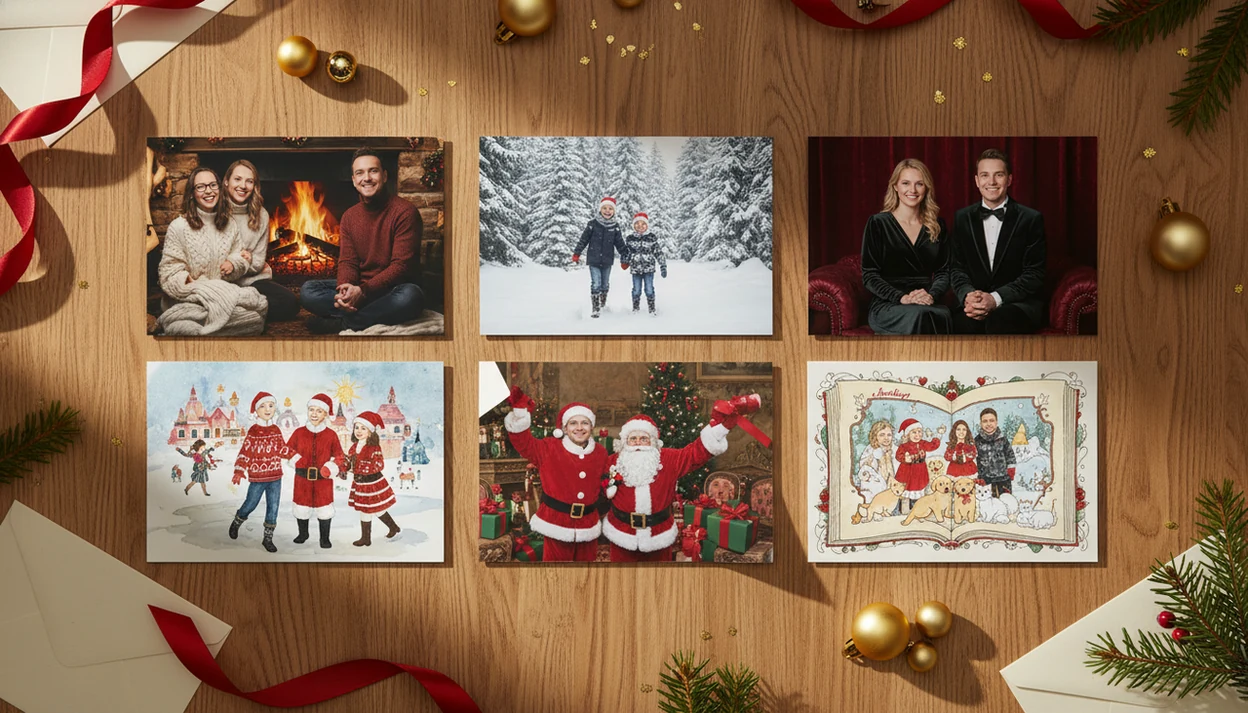
You can see AI Christmas card styles by uploading one clear photo and previewing several festive portrait looks before choosing a printable or digital card design. a Christmas card app focuses those previews on family, couple, pet, Santa, illustrated, and classic holiday card outcomes so you can compare the mood before you commit.
Definition:
TL;DR
- Start with a bright, front-facing phone photo with visible faces and some upper body.
- Preview realistic, illustrated, cozy, Santa, pet, and formal AI holiday portrait styles before choosing a card layout.
- Pick cleaner, higher-contrast styles for printing and save heavily stylized looks for digital greetings when likeness matters less.
AI Christmas Card Styles At A Glance
AI Christmas card styles are previewable outcomes, not just static templates. When you see AI Christmas card styles, you are comparing how one source photo changes across background, lighting, clothing, props, and card mood.
| Style | Best use case | Print suitability | Starting photo needs |
|---|---|---|---|
| Family cozy | Parents, kids, casual home photos | High | Clear faces, some upper body |
| Couple winter | Engagements, spouses, partners | High | Two sharp faces, simple pose |
| Pet storybook | Dogs, cats, pet-only greetings | Medium | Bright eyes, full head visible |
| Santa scene | Kids, playful family cards | Medium | Front-facing child or group |
| Illustrated | Messy rooms, softer likeness needs | Medium | Usable face shapes, not too dark |
| Formal portrait | Traditional mailed cards | High | Sharp, well-lit, uncluttered photo |
A portrait cropped for a story can work, but leave more space than you think. Greetings need breathing room.
How AI Christmas Card Styles Work
AI Christmas card styles work by using your uploaded photo as the reference for who is in the card and how the portrait is arranged. The system keeps cues such as face shape, pose, and spacing, then generates a holiday version around them.
That is different from a simple filter, which mostly changes color, contrast, or texture. Image-to-image generation, meaning a new image built from your photo, can also create snowy backgrounds, velvet outfits, fireplace light, ornaments, Santa props, or cleaner studio lighting. The tradeoff is that stronger stylization gives the model more freedom, so likeness can soften: eyes may shift, teeth may change, or a child’s face may look almost right but not quite like them.
Before printing or sharing, use a quick preview pass:
- Zoom in on faces, eyes, teeth, hairlines, hands, and pet details.
- Check whether the crop leaves room for names, dates, and the greeting.
- Compare contrast and darkness against a printable card, not just a glowing phone screen.
- Confirm that props, outfits, and background details look festive without distracting from the people.
AI Holiday Portrait Style Generation
AI holiday portrait style generation uses an uploaded photo as the identity and composition reference, then creates a new festive version from that input. In plain terms, the model reads the face, pose, and scene structure, then rebuilds the image in a chosen holiday look.
This is more than a filter. Image-to-image generation may regenerate the background, clothing, lighting, snow, trees, ornaments, fireplace glow, or the whole card mood. A filter mostly changes color and contrast. A generation can replace the living room with a snowy porch.
Stronger stylization can reduce likeness accuracy. That matters when grandma will notice one red-eye flash is gone, but your toddler’s cheeks look unfamiliar. For one-photo workflows, the broader process is covered in our AI Christmas card from one photo guide.
How To Use AI Christmas Card Styles
Use AI Christmas card styles by starting with the cleanest possible photo, then choosing the look before you fuss with the wording. The goal is to lock in a believable portrait first and treat the card layout as the final pass.
- Upload one bright photo where faces point forward and shoulders are visible, even if the background is not perfect. A simple phone snapshot often beats a dark, tightly cropped favorite.
- Choose one style family before editing names, greetings, or layout details. Cozy, formal, illustrated, Santa, pet, and snowy styles each leave different amounts of space for text.
- Compare three to six previews at full zoom instead of trusting the first festive result. Look for the version that still feels like your people, not just the one with the prettiest fireplace.
- Check faces, hands, pets, text space, and crop margins before you call it done. Small artifacts are easier to catch now than after printing.
- Download print and digital versions only after the final text review, especially dates, family names, apostrophes, and line breaks.
AI Christmas Card Style Example Workflow
Use this workflow when you want to preview styles without turning the card session into a design project. It works especially well at 9:47 p.m., when the kids are asleep and the phone battery is at 18%.
- Upload a bright phone photo with faces forward and some upper body visible.
- Choose a style family, such as cozy, illustrated, Santa, pet, formal, or snowy portrait.
- Frame the image in a 3:4 portrait crop when possible, leaving headroom for greetings.
- Compare several previews side by side, not just the first one that looks festive.
- Check faces, eyes, hands, pets, and open space for names or “Merry Christmas.”
- Download a printable version or save a digital greeting backup before editing text again.
Save the draft before you fuss with wording.
Method For Printable Christmas Card Style Examples
Printable Christmas card style examples should be judged by card outcome, not by how dramatic the preview looks on a phone. A shiny style can still fail if the names sit over a busy sweater or the faces soften in print.
- Likeness: Faces should still look like the people in the original phone photo.
- Background cleanup: The style should reduce distractions, such as a dog leash in the corner.
- Holiday mood: Snow, lights, trees, and color should support the greeting, not bury it.
- Text space: The design needs clear room for names, dates, or a short message.
- Print readiness: Higher contrast, clean edges, and enough resolution matter for cardstock.
In 2022, 60% of U.S. adults said they send holiday cards or greetings, according to Pew Research Center (https://www.pewresearch.org/short-reads/2022/12/20/about-six-in-ten-americans-send-holiday-cards-or-greetings/). A useful Christmas card style preview should show likeness, crop safety, text space, and export quality before you pay, print, or send the card.
Family AI Christmas Card Styles For One Phone Photo
Family AI Christmas card styles work best when they match the chaos level of the starting photo. Start with the photo you already have, then pick the style that hides the right problems.
- The Ramirez living-room photo: Cozy illustrated or watercolor styles can soften yellow living-room light and blur a cluttered couch.
- The Nguyen snowy-card plan: A snowy porch style works when everyone faces forward, even if the original background is plain.
- The Brooks classic mailing card: A studio portrait style fits sharp, front-facing photos where likeness matters most.
- The Patel big-family group: Classic or watercolor styles may handle wrinkled holiday sweaters on chair backs, but large groups raise artifact risk around faces and hands.
For families, illustrated styles usually handle messy source photos better than realistic studio styles because they forgive background noise and small lighting flaws. If printing is the goal, pair the style choice with a printable Christmas card maker workflow.
Couple, Pet, And Santa AI Holiday Portrait Styles
Couple, pet, and Santa styles can be more playful than traditional family cards. They also give the model more room to invent props, which is useful but worth checking.
- Maya and Chris, sidewalk selfie: A romantic winter or magazine-cover look fits a clear two-person photo with simple shoulders and good face light.
- Otis the golden retriever: A storybook pet style works well when the dog’s eyes and ears are visible, especially for digital greetings.
- Lena’s Santa scene: A North Pole or fireplace style can add Santa props, toy shelves, and warm light around a child’s portrait.
- The mixed pet-family card: Use cozy illustrated if the cat, dog, and child are all competing for attention.
Pets and Santa props may be regenerated more freely than human faces. That can be charming. It can also add a strange paw, a melted bow, or a toy that looks like a mitten.
Common Patterns In AI Christmas Card Style Results
Most AI holiday portrait styles follow predictable patterns once you compare enough previews. The trick is choosing the style that matches the photo’s weakness, not just the style name you like.
- Painterly and illustrated styles often work well when the original background is messy.
- Realistic studio styles usually work best with already sharp, well-lit photos.
- Ultra-dark, neon, or busy styles can look worse when printed on matte cardstock.
- Crowded group photos raise the chance of warped fingers, softened eyes, or mismatched faces.
- Pew Research Center reported in 2023 that public awareness of generative AI tools was rising, especially around ChatGPT and creative uses (https://www.pewresearch.org/short-reads/2023/05/24/a-majority-of-americans-have-heard-of-chatgpt-but-few-have-tried-it-themselves/), which helps explain why AI holiday portrait styles have become more familiar to casual card makers.
For last-minute cards, an app that turns photo into AI Christmas card can be faster than building a layout from blank templates because the style preview and card format stay connected.
AI Christmas Card Preview Gaps
AI Christmas card previews are useful, but they do not show every print problem. A design that looks rich on an iPhone can print muddy if the shadows are heavy, the contrast is low, or the export is too small.
Exact facial likeness cannot be guaranteed in every generation. Check face details at full zoom, especially eyes, teeth, hairlines, and small children. We have rejected previews where one child looked great and another looked like a cousin.
Text placement still matters after the image looks right. Leave crop margins, avoid putting names too close to trim edges, and remember envelope-safe trimming if you are printing stacks. Re-run the style when hands, eyes, pets, or toddlers look wrong. The download folder fills fast, so label the usable file before it becomes final-final-card.pdf.
Limitations
AI holiday portrait previews help you choose a look, but they are not a guarantee of print-ready perfection.
- Extra fingers, warped eyes, mismatched faces, and small artifacts can appear in otherwise good previews.
- Dark, blurry, tightly cropped, or crowded source photos usually produce weaker results.
- Large family groups increase the chance that one face looks less accurate than the others.
- Some tools limit high-resolution exports or place them behind paid tiers.
- Trendy neon, fantasy, or comic styles may not match traditional family card expectations.
- Exact outfits, poses, heirloom ornaments, and niche background requests can be inconsistent.
- Pet markings, collars, and paws may change during generation.
- Home printing can still shift color or pull cardstock slightly crooked in the inkjet tray.
If the card is for mailed keepsakes, choose the calmer version. If it is for a quick texted digital greeting, you have more room to be playful.
FAQ
Is there an app for AI Christmas card styles?
Yes. a Christmas card app lets you upload one photo and preview AI Christmas card styles before choosing a printable or digital card design. Broader design tools such as Canva, Adobe Express, Shutterfly, and Minted can help with layouts, but they usually require more manual template selection.
Can AI Christmas cards keep faces accurate?
AI can often preserve likeness, especially from clear front-facing photos. It may still distort faces, eyes, teeth, or small children in some generations.
Which photo works best for an AI Christmas card?
Use a clear, bright, front-facing photo with visible faces and some upper body. Avoid dark, blurry, heavily cropped, or crowded images.
Do AI Christmas cards print well?
AI Christmas cards can print well when the export has enough resolution, contrast, clean crop margins, and simple visual detail. Very dark or busy styles may look muddy on paper.
Can I use pet photos for AI Christmas cards?
Yes. Dogs and cats often work well in storybook, cozy fireplace, snowy, or illustrated styles, while mixed family-pet cards need extra face and paw checks.
Are free AI Christmas card previews enough?
Free previews are often enough to compare style direction. High-resolution downloads, watermark removal, or print-ready files may require payment in some tools.
What AI Christmas card style hides messy backgrounds?
Illustrated, watercolor, snowy, and storybook styles usually hide messy backgrounds better than realistic studio styles. They soften clutter while keeping the greeting festive.
Can ChatGPT make Christmas cards from my photo?
ChatGPT can help write prompts, greetings, and card wording. A card app such as a Christmas card app or PiXmas Cards handles photo upload, layout preview, and export for printing or sharing.
What AI Christmas Card Styles Can Invent and What One Photo Must Provide
AI Christmas card styles can invent seasonal settings, wardrobe, lighting, color palettes, decorative borders, and illustrated treatments, but the source photo must supply the people or pets you want recognized. For a one-photo card, choose an image with sharp, unobstructed faces, natural expressions, visible hairlines, and enough shoulder or body detail to support the requested composition. AI can replace an ordinary room with a snowy street, cozy cabin, ornament studio, vintage postcard, watercolor scene, or storybook setting. It can also coordinate clothing and add props, but these changes may alter covered features. No fixed style list guarantees a faithful result; tiny faces, crossed arms, cropped heads, glare, and hidden pet markings leave the model to guess. Keep identity-critical details in the original photo and use the style request mainly for atmosphere, costume, and surroundings.
Which Details Must the Selfie Supply for AI Christmas Card Styles?
AI Christmas card styles can invent festive surroundings and decoration, but the selfie must clearly supply each person’s recognizable features and visible relationships.
- Snowy scenes, ornaments, lights, fireplaces, and illustrated borders can be generated without appearing in the original setting.
- Holiday clothing may be invented, but covered shoulders, cropped arms, or hidden hands leave the system guessing about body position.
- Faces still need visible eyes, facial contours, hairlines, and expressions; decorations cannot restore identity details absent from the selfie.
- Group placement comes from the original photo. Overlapping faces or people at very different distances may produce merged features or inconsistent scale.