
Add Santa to a photo for Christmas morning and your family card
Quick answer: On Christmas Eve, after the kids are asleep, photograph the spot Santa would use (the tree, the stairs, the stockings) with nobody in it. Add Santa from behind with a free app such as Catch Santa Claus In My House or Capture The Magic, or with an AI photo editor. Then use the picture twice: as a small print by the empty cookie plate on Christmas morning, and on a he-came card for the grandparents.
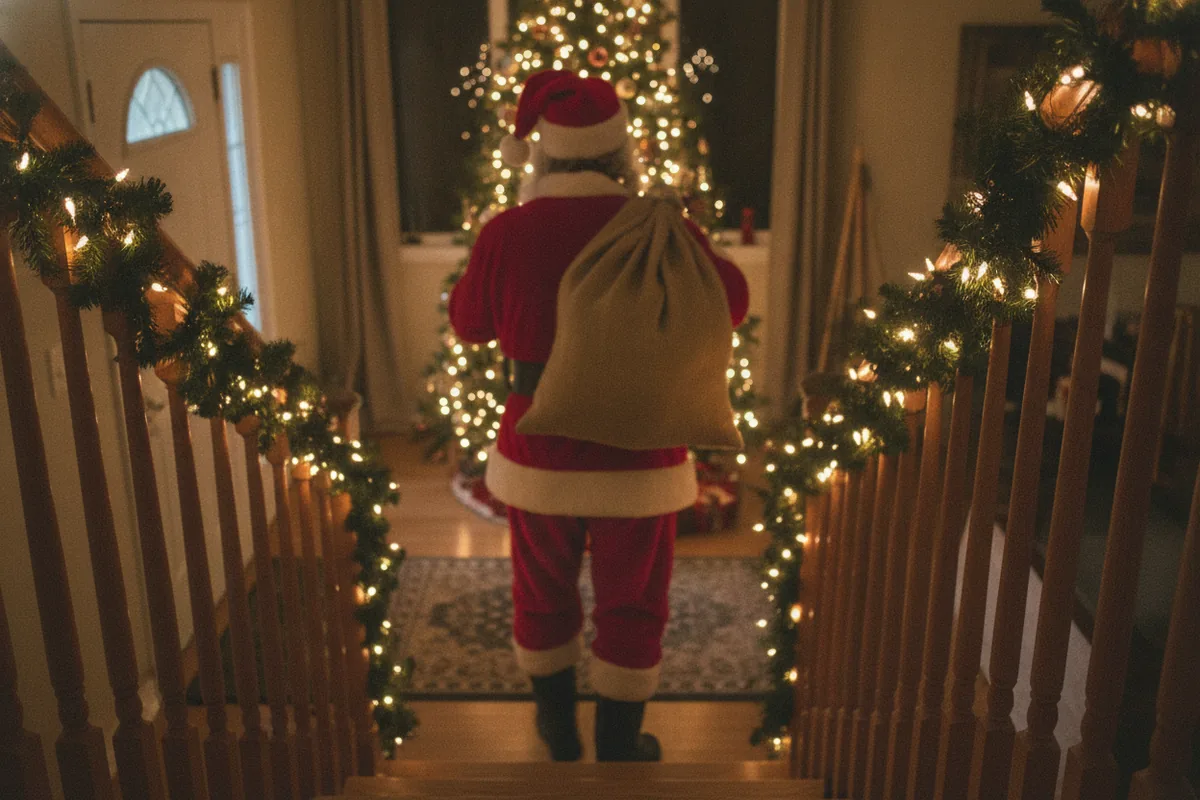
Plan it as one photo with three jobs
Most people make a Santa photo on Christmas Eve at 11 p.m., show it once and forget it. With a little planning the same file does three things for the family, and the plan fits in one table.
| When | What you do | Where the photo ends up |
|---|---|---|
| A few days before | Pick the spot and test the angle once with the tree lights on. Download your app and try one free pose. | Nowhere yet |
| Christmas Eve, after bedtime | Shoot the empty room, add Santa, set out the props. | Your camera roll (hidden album) |
| Christmas morning | A 4x6 print propped by the cookie plate, or the photo on your phone. | The kids' hands |
| Christmas Day | Send a digital he-came card to grandparents and godparents. | Family group texts and email |
| December 26 to January | Order a New Year card, or save the photo for next year's card. | Mailboxes and the fridge door |
The card part is the bit people skip. A Christmas card mailed in early December can't show something that happened on December 24, but a New Year card can, and a digital card on Christmas morning can too.
Choose the spot Santa used
Kids check certain places first. Put Santa where they will look, and the photo becomes part of the morning instead of a separate show-and-tell.
- The stairs. Shot from the top, looking down toward the tree, like the example above. It is how a child would have seen him if they'd snuck out of bed.
- The cookie plate. Santa's back and one gloved hand reaching for a cookie. Leave crumbs and half a cookie on the real plate.
- The stockings. Santa from the side, filling one stocking. Choose the stocking of the child most likely to ask questions.
- The front door or back door. No chimney? Plenty of families tell kids Santa uses a magic key. A door shot answers that question before it gets asked.
Skip the kids' bedrooms. It's tempting, but a photo of Santa next to a sleeping child feels a bit odd to many parents, and it puts your child's face into an editing app.
Shoot the empty room
Wait until it's properly dark. Turn off overhead lights so the tree lights and maybe one lamp are the only sources; warm, low light hides edges and makes any added figure easier to blend. Hold the phone at about a child's eye level, brace it on a banister or stack of books, and take five or six frames. Leave clear floor space where Santa will stand. If he has nowhere to put his feet, no app can fix it.
Set the scene before you shoot: stockings filled, gifts out, cookie plate already eaten from. The photo should look like the morning the kids will walk into.
Three ways to add Santa
| Method | Tools (checked November 2026) | Cost | Good for |
|---|---|---|---|
| Santa app with ready-made poses | Catch Santa Claus In My House (iPhone and Android), Capture The Magic (iPhone) | Free download; extra poses and packs about $0.99 to $5.99 | A result in ten minutes on the night |
| AI photo editor from a text prompt | Google Photos Magic Editor (10 free saves a month; the Reimagine prompt tool is on Pixel 9 and newer), ChatGPT, Gemini | Free tiers with limits | Odd angles like stairs and doorways |
| Layers by hand | Photopea in a browser, Photoshop, Procreate | Free to paid | People who already edit photos |
With an app, pick a pose seen from behind or the side, pinch to size him so he's about as tall as a doorway's lower three quarters, and darken him until he matches the furniture next to him. With an AI editor, describe the light ("lit only by the warm Christmas tree lights from the left") and say what must not change. For the stairs example above we asked for Santa seen from behind, mid-step, slightly blurred, carrying a sack toward the tree.
Apple's Clean Up tool in iPhone Photos is the wrong tool here: it removes objects; it doesn't add them. It's handy before the edit, though, for erasing a laundry basket from the corner of the room.
Make it hold up at the breakfast table
A Santa photo on a card is seen at a few inches across. The same photo in a child's hand at 6 a.m. gets studied. A few things help:
- No face, or almost none. A back, a hand, a boot. Faces are where AI and cutouts look strange, and a hidden face is also more mysterious.
- A bit of motion blur. Santa is in a hurry; a perfectly sharp figure in a dim, grainy room looks pasted in.
- Same Santa every year. If this becomes a tradition, keep the suit style consistent. Kids compare.
- Print small. A 4x6 print from a home printer or drugstore hides more than a phone at full zoom.
Christmas morning props that back up the photo
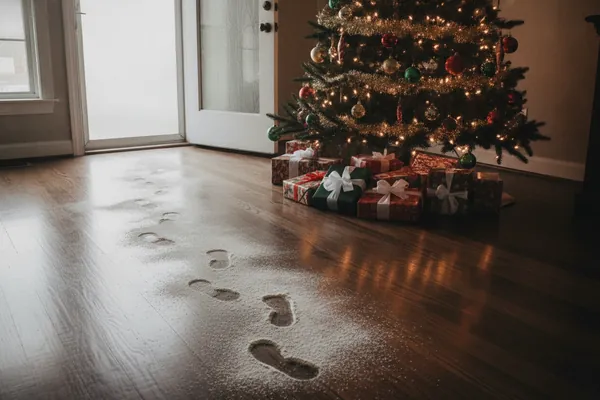
The photo works best as one clue among several. Boot prints in flour or baking soda on a dark floor (cut a sole shape from a cereal box, sift around it, lift). A carrot with a bite out of it for the reindeer. A thank-you note in shaky cursive next to the cookie crumbs; our letter to Santa templates include a reply page from Santa you can fill in the night before. And on Christmas Eve, a call or voicemail from Santa sets the scene; our guide to calling Santa lists the options that are free.
Then prop the printed photo against the empty milk glass. Let the kids find it.
Turn it into a he-came card
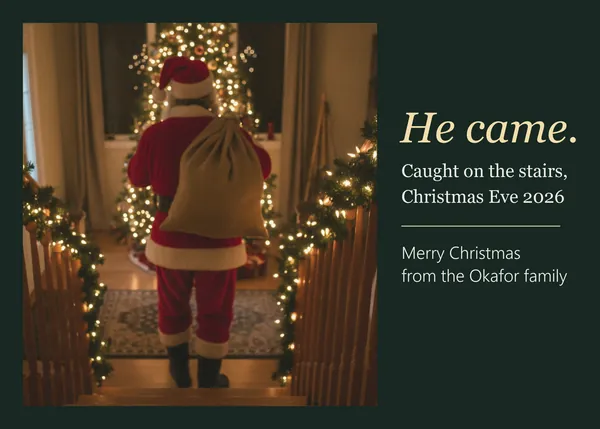
Grandparents love this card because the picture comes with its story. Use a horizontal 7x5 layout so the room has space, and keep the words short. Some lines that fit:
He came. Caught on the stairs, Christmas Eve 2026.
Proof, as requested. Love from the Okafor family.
The cookies are gone. So is he. Merry Christmas.
Santa was here at 11:42 p.m. (we checked the camera roll).
Last Christmas he came down our stairs. Happy New Year from all of us.
For a printed version, mail it as a New Year card. USPS recommends mailing First-Class cards by December 17 for Christmas delivery in 2026, so anything with a Christmas Eve photo is naturally a late-December or January card. Our Christmas card mailing timeline has the full calendar. For a digital card, send it Christmas morning while the kids are still opening gifts.
Keep the story straight
A Santa photo is a small, friendly piece of family theater. A few rules keep it that way.
Decide who's in on it. Older siblings and cousins can be great helpers (some kids love being promoted to Santa's assistant the year they figure it out), but agree on it ahead of time, before a 10-year-old replies "lol photoshop" in the family chat.
Keep it off public feeds. A public post reaches classmates and their parents. A private album, a group text or a printed card stays in the family.
Hide the working files. The empty room shot and the app screenshots sit right next to the finished picture in your camera roll. Move them to a hidden album before you hand your phone to a child.
And when a child finally asks you straight out, the photo doesn't have to become evidence of a lie. Many families make the reveal part of the tradition: the child helps stage next year's photo for a younger sibling.
On privacy more broadly, the empty-room approach keeps your children's faces out of AI tools entirely. If you do plan to upload kids' photos for other cards this year, read our notes on child photo safety for Christmas cards first. For a lighter edit with everyone in the picture, try adding Santa hats to the family photo instead.
Frequently asked questions
What is the best room to put Santa in for a photo?
Pick the spot your kids will check first on Christmas morning: the tree, the stockings, the cookie plate or the bottom of the stairs. A room lit only by tree lights hides small editing flaws better than a room under a ceiling light.
Which free app puts Santa in a picture of your house?
Catch Santa Claus In My House (iPhone and Android) and Capture The Magic (iPhone) are free downloads with extra Santa poses sold in the app, roughly $0.99 to $5.99 each when we checked the store listings in November 2026.
Can I use the Santa photo on a Christmas card?
Yes, but plan the timing: the photo is taken on Christmas Eve, so it suits a digital card sent on Christmas morning, a New Year card mailed after December 25, or next year's card as a look back.
How do I show my kids the Santa photo without them noticing it is edited?
Show it once, on a phone or as a small 4x6 print, and let the physical clues (an empty cookie plate, boot prints, a note) do most of the convincing. A huge TV screen invites zooming in on edges.
Can Google Photos add Santa to a picture?
Google Photos Magic Editor gives most Android and iPhone users 10 free saves a month, and its text-prompt feature Reimagine is limited to Pixel 9 and newer phones per Google's help pages. Results vary, so keep the original photo.
Should I put my child in the photo with the added Santa?
For the Santa visited picture, no. The story is that Santa came while everyone slept, and an empty room also means you are not uploading a child's face to an AI service.
What should I write on a Santa visited card?
Keep it short and in character, such as "He came. Caught on the stairs, Christmas Eve 2026" with the family name underneath. Avoid wording that hints the picture was made, like "look what we edited".
How do I make flour boot prints for Christmas morning?
Cut a boot sole shape from cardboard, set it on a dark floor, sift flour or baking soda around it, lift it straight up and repeat in a trail toward the tree. A dry soft brush and a vacuum clean it up afterward.