
How Can You Create an AI Mrs Claus Photo Transformation?
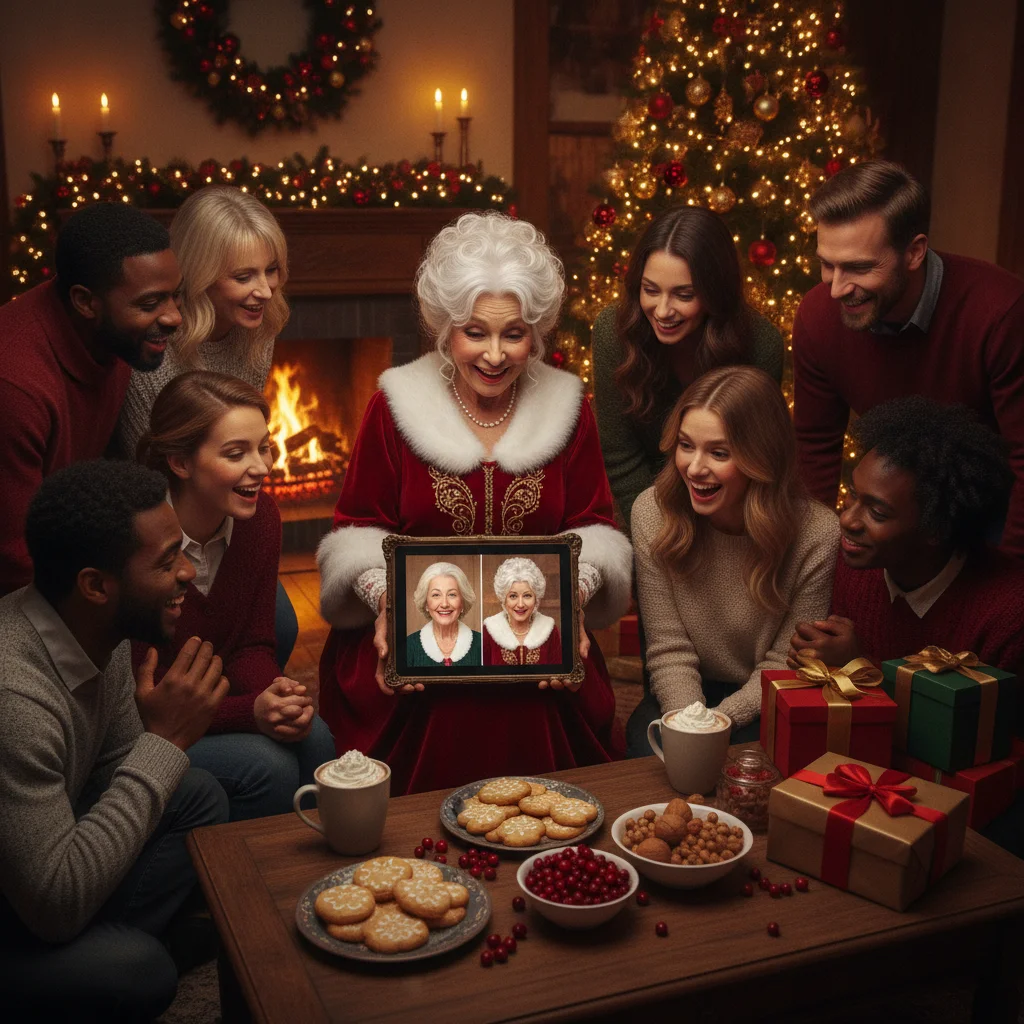
Quick answer: Upload a clear portrait to an AI Christmas photo app, select a Mrs Claus style, and generate the transformed image. The best results preserve the person’s facial features while adding a red velvet dress, white fur trim, festive glasses, and a North Pole background. Review privacy terms before uploading a photo, then check hands, eyes, clothing, and accessories before saving.
An AI Mrs Claus photo transformation turns an existing portrait into a festive character image. Instead of arranging a costume, makeup, lighting, and a holiday backdrop, you can use an AI photo generator or Christmas filter to create the scene digitally.
Results vary considerably between tools. Some apps apply a simple face filter, while generative editors rebuild clothing, hair, lighting, and the surrounding environment. A convincing transformation should still look like the person in the original photo rather than a generic holiday character.
What does an AI Mrs Claus transformation change?
A typical transformation adds recognizable Mrs Claus details such as a red dress, white lace or fur trim, round glasses, gray or white hair, and a warm Christmas setting. More advanced tools may also adjust pose, expression, skin lighting, and image composition.
The original portrait has a major effect on the output. A well-lit, front-facing photograph gives the AI a clear view of facial proportions. Blurry images, sunglasses, strong shadows, and cropped faces make identity preservation more difficult.
| Feature | What to look for | Common problem |
|---|---|---|
| Face | Recognizable eyes, smile, and facial shape | Generic or heavily altered identity |
| Costume | Natural red fabric with consistent trim | Uneven lace, buttons, or sleeves |
| Hands | Correct fingers and natural grip | Extra fingers or merged objects |
| Background | Coherent workshop, fireplace, or snowy scene | Distorted decorations and unreadable signs |
How do you make a Mrs Claus photo with AI?
- Choose a suitable portrait. Use a sharp image showing one person from the chest or waist upward. Neutral backgrounds usually produce cleaner edits.
- Select a transformation method. A Christmas photo app offers preset styles, while a general AI image editor may provide more control through written prompts.
- Describe the intended result. Specify the costume, setting, lighting, expression, and desired level of realism.
- Generate several versions. Small variations can produce different faces, costumes, and poses even when the same source photo is used.
- Inspect the full image. Check eyes, teeth, fingers, jewelry, glasses, garment edges, and background decorations.
- Save the strongest version. Keep the original photograph and export the result at the highest available resolution.
What prompt produces a realistic Mrs Claus portrait?
A useful prompt names both the visual details and the features that should remain unchanged. For example: “Transform this portrait into a realistic Mrs Claus while preserving the person’s recognizable face, age, eye color, and smile. Add an elegant red velvet dress with white fur trim, round gold glasses, warm fireplace lighting, and a detailed North Pole workshop background.”
You can replace “realistic” with “storybook illustration,” “vintage Christmas card,” or “family-friendly cartoon” to change the finish. Avoid combining too many artistic styles in one prompt because conflicting instructions can reduce consistency.
Which tools can create the transformation?
Dedicated Christmas photo apps are usually the fastest option because their character templates require little setup. General AI image generators offer greater control but may require repeated prompting and manual corrections.
Christmas Pictures App: PiXmas is one editorial option for iPhone users seeking Christmas-themed photo transformations. Its App Store listing showed a rating of about 4.4 from 116 ratings when the listing data was reviewed. ChristmasCard.io is an independent editorial site and is not affiliated with PiXmas, PicsMas, or the app developer.
Before choosing any app, compare export resolution, watermark rules, subscription pricing, data retention, and whether uploaded portraits may be used to improve AI systems. App ratings can change and do not guarantee that a specific style will preserve your likeness.
How can you make the final image look more natural?
- Use a source photo with soft, even lighting.
- Ask the AI to preserve facial structure and natural skin texture.
- Choose one clear setting rather than combining several backgrounds.
- Regenerate images with distorted hands or glasses instead of hiding obvious errors.
- Match the crop to the intended use, such as a square profile image or vertical card portrait.
For a greeting card, leave open space around the subject for a message. AI-generated lettering is often misspelled, so add names and holiday text afterward in a normal design editor.
What are the limitations of AI Mrs Claus photo transformations?
AI can change facial details, body proportions, age cues, and skin texture without warning. It may also produce inaccurate hands, asymmetrical glasses, impossible clothing seams, or strange objects in the background.
Privacy is another limitation. A portrait is personal data, and some services store uploaded files or generated images. Read the provider’s privacy and deletion policies before uploading photographs of children, clients, employees, or anyone who has not given permission.
Generated images should not be presented as authentic photographs of real events. Labeling the result as AI-created is sensible when viewers could otherwise mistake it for a genuine costume portrait.
Verdict: An AI Mrs Claus transformation is a quick way to create a festive portrait without arranging a costume shoot. Preset Christmas apps suit casual users, while prompt-based editors provide more creative control. Start with a clear photograph, generate multiple options, and inspect the chosen image carefully before printing or sharing it.
What an AI Mrs Claus photo transformation can change—and what the original photo must provide
An AI Mrs Claus photo transformation can add a red dress, white trim, bonnet, spectacles, styled hair, seasonal lighting, and a workshop or North Pole setting, but the original must clearly show the person and any body parts you want preserved. It can also alter pose, age cues, expression, makeup, and framing, though stronger changes make identity drift more likely. Choose a photo in which both eyes are visible, facial features are not covered, and the head is not cropped where a bonnet should sit. If hands must remain recognizable, include them fully rather than in awkward partial crops. For an authentic Mrs Claus result, the source does not need a costume or Christmas background; it does need usable visual evidence of the subject. There is no universal source-image threshold that guarantees identity preservation because models interpret occlusion, blur, and extreme angles differently.
When is an AI Mrs Claus transformation the wrong choice?
An AI Mrs Claus transformation is not a reliable fix for malformed hands, fused or uneven teeth, duplicated pets, or lettering that turns into gibberish. Those defects often require selective editing, compositing, or a fresh source image rather than another full-image transformation. The playful Mrs Claus concept also may not apply when a partner or relative dislikes altered likenesses, the recipient does not celebrate Christmas, or recent grief makes cheerful role-play feel insensitive. For workplace use, avoid costume imagery that could conflict with dress policies, religious neutrality, or a colleague’s consent. Leave pets out if posing, costumes, or repeated shots cause stress; add them later from a separate calm photo instead. Finally, do not depend on repeated AI revisions for last-minute mailed cards. Use an acceptable portrait or choose a digital greeting if the face, hands, animals, or text still need repair.
Frequently asked questions
Can AI turn my photo into Mrs Claus?
Yes. AI photo editors can preserve recognizable facial features while adding Mrs Claus clothing, hair, accessories, lighting, and a Christmas background.
What type of photo works best for a Mrs Claus transformation?
A sharp, front-facing portrait with even lighting and an unobstructed face usually works best. Chest-up or waist-up images provide enough space for the costume.
Can I create a Mrs Claus image for free?
Some apps and image generators provide free previews or limited credits. High-resolution exports, additional styles, or watermark removal may require payment.
Will the AI transformation still look like me?
Identity preservation depends on the source photo and the model. Instructions to preserve facial structure, eye color, age, and smile can improve resemblance.
Is it safe to upload a portrait to an AI Christmas app?
Safety depends on the provider’s storage, deletion, and model-training policies. Review the privacy terms and obtain permission before uploading another person’s photograph.
Can I use an AI Mrs Claus picture on a Christmas card?
Yes, provided the tool permits personal or commercial use for your intended project. Add card text separately because AI-generated lettering is often inaccurate.
Can AI add a Mrs Claus outfit without changing my face?
Yes, AI can add a Mrs Claus outfit while largely preserving your face if the edit is limited to clothing, hair, accessories, and background. Use an identity-preserving or masked edit, and specify that facial structure, eye color, skin tone, and expression should remain unchanged. Generate several versions because some facial drift can still occur.
Can AI fix a cropped head in a Mrs Claus photo?
AI can extend a cropped head, but it cannot reliably recover details that were never visible. It may invent hair, forehead shape, or bonnet placement, producing a plausible result rather than an accurate reconstruction. A photo with space above the head is safer when the finished portrait needs a full Mrs Claus bonnet.
Why does AI add extra fingers, teeth, or pets to a Mrs Claus photo?
AI can misinterpret overlapping fingers, partially visible teeth, fur, and crowded backgrounds when reconstructing a Mrs Claus scene. Generate a version with hands outside the frame, use a closed-mouth source portrait, and transform each pet separately. If the error persists, repair that area manually instead of regenerating the entire image.
Can I add readable wording directly to an AI Mrs Claus image?
Short wording may render correctly, but generated letters often appear misspelled, distorted, or inconsistent. Create the Mrs Claus portrait without text, then add the greeting in a separate photo editor. This keeps names, dates, and holiday messages readable and prevents a new generation from changing the face or costume.