
ChatGPT Christmas photo 2027: how to make one for your card, plus 15 prompts
Updated November 20, 2026
Quick answer: To make a ChatGPT Christmas photo, tap the + button, choose Add photos & files, attach a clear family photo, and paste a prompt that starts "keep every person's face exactly the same" before describing the Christmas scene. Free accounts can do this, with a daily limit OpenAI doesn't publish. Save the result with the Save button, then upscale it 2x if it's going on a printed 5x7 card.
What the trend is (and why it took off in December 2025)
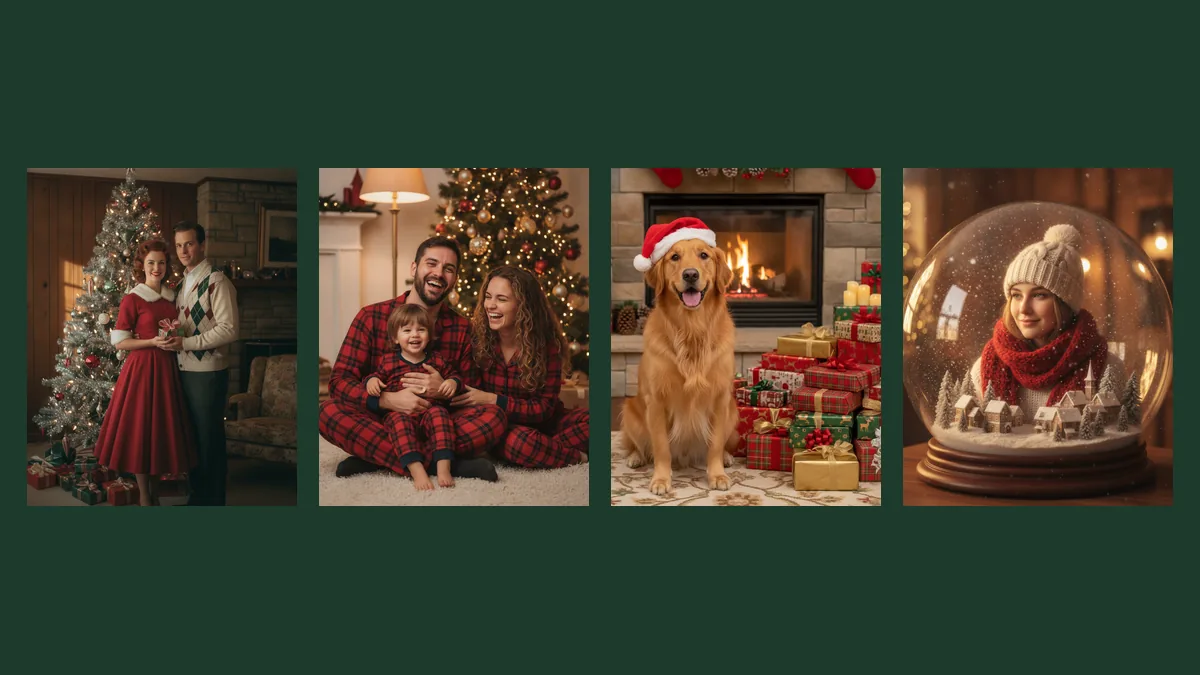
Last December, people started posting their regular phone photos next to a ChatGPT version: the same faces, suddenly standing in a candy-cane studio, a snowy cabin or a 1950s living room. Prompts were copied from TikTok and Instagram, and by mid-December news sites were running "copy this prompt" stories. A few looks dominated. Pink-and-white peppermint glam portraits. Cozy family scenes with a tree, a fireplace and matching pajamas. Winter-wonderland snow. And, late in the month, family photos turned into Norman Rockwell-style paintings.
There was also a separate, hidden holiday feature. Sending a wrapped-gift emoji in a new chat made ChatGPT ask for a selfie and reply with a short Santa video, made with OpenAI's Sora video model. That one was a video, not a photo, and it was seasonal. OpenAI hasn't said whether it will come back this year.
Step by step in ChatGPT
On the web or the iPhone and Android app
- Pick your photo. Faces should be sharp, evenly lit and unblocked: no sunglasses, no hands in front of mouths. Everyone roughly the same size in the frame helps a lot.
- Open a new chat (or a Temporary Chat, see the privacy section). Tap or click the + button by the message box and choose Add photos & files.
- Attach the photo and paste one of the prompts below. Send it.
- Wait. Image generation takes noticeably longer than a text answer.
- Look at every face before anything else. If one is off, see "Fixing faces" below rather than starting over.
- Open the image full screen and tap Save. On iPhone this saves the image to Photos; Copy only puts it on the clipboard. Don't screenshot it, which throws away pixels.
There's also an Images section in ChatGPT, on web and mobile and on the free plan, with preset styles you can tap without writing a prompt, and a list of everything you've made. It's handy for browsing looks, but for a family card photo a written prompt gives more control.
About limits: free accounts get a limited number of images, and OpenAI doesn't publish the count; a message tells you when you hit it. In November 2026 the image system is called ChatGPT Images 2.6 and runs on every plan. Paid plans get more.
15 ChatGPT Christmas photo prompts for a card
Each prompt starts by pinning the faces, then asks for one scene. Copy it, swap the details (sweater colors, a pet's name, the number of kids), and keep the "space above our heads" part if a greeting is going on the photo. We wrote these for card photos; we didn't run each one through ChatGPT for this page, so expect to adjust.
Family cards
1. Classic living room
Using the attached photo, keep every person's face, age, hair and expression exactly the same. Place us on a sofa in a warm living room at night with a lit Christmas tree on the left and stockings on a mantel. Coordinated cream and forest green sweaters. Soft lamp light, realistic photo, vertical 2:3, leave empty space above our heads for a greeting.
The safest card photo: small change, faces hold up well.
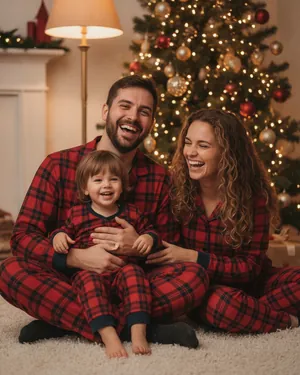
2. Matching pajamas
Keep the same people and faces from my photo. Dress everyone in matching red buffalo-check pajamas and sit us on a rug in front of a Christmas tree with wrapped gifts. Natural laughter, warm evening light, realistic, vertical.
Works for families with toddlers who would never sit still for real pajama photos.
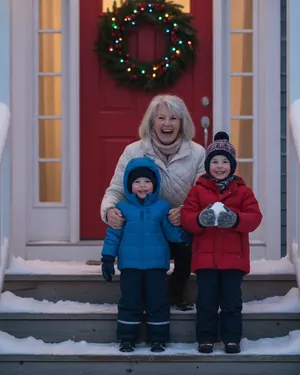
3. Snowy front door
Keep our faces and ages. Put us in winter coats and knit hats in front of a red front door with a pine wreath and string lights, light snowfall at dusk. Realistic photo, the whole family in frame with space at the top.
Bigger change, so check every face twice.
4. Christmas tree farm
Keep the people in my photo exactly as they are. Set the scene at a snowy Christmas tree farm, with us standing beside a freshly cut fir on a sled. Overcast winter light, realistic photo, horizontal 3:2.
Horizontal suits a sideways 5x7 card.
Couples and solo
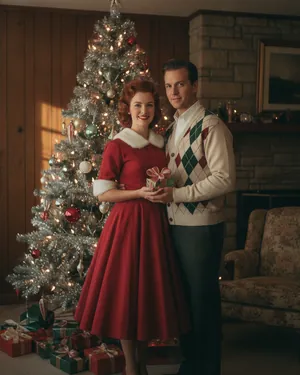
5. 1950s card photo
Recreate this photo of us as a 1950s Christmas card portrait: same faces, she in a red swing dress, he in a cardigan, standing by a tinsel tree. Soft film grain and faded Kodachrome color. Vertical 4:5.
The vintage look forgives small face changes.
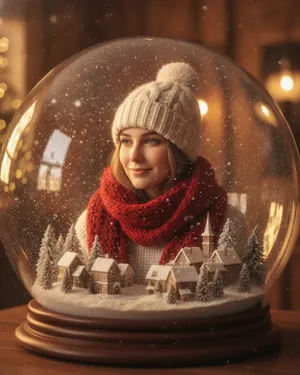
6. Snow globe
Place the person from my photo inside a large glass snow globe, wearing a cream knit hat and a red scarf, with tiny snowy houses around the base. Keep the face exactly the same. Magical soft light, photorealistic, square.
A good single-person card or a profile picture.
7. City lights at night
Keep our faces. Show us walking arm in arm on a city street at night with shop windows, garlands and falling snow, warm bokeh lights behind us. Realistic photo, vertical.
Engagement-year and first-Christmas cards.
Kids
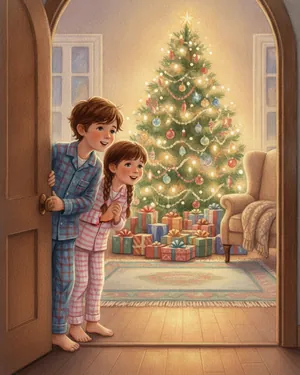
8. Peeking at the tree
Turn my kids' photo into a gentle storybook illustration: the same two children in pajamas peeking around a doorway at a glowing Christmas tree with presents. Soft gouache painting, warm colors, vertical 4:5.
Illustration is kinder to small likeness errors.
9. Baking cookies
Keep my child's face and age exactly. Show them at a kitchen counter decorating gingerbread cookies, a little flour on their cheek, Christmas lights in the window. Realistic photo, natural light.
Cute for grandparents' cards.
10. Letter to Santa
Keep the same child. Show them writing a letter at a wooden table by a window with snow outside, a mug of cocoa and a candle beside them. Realistic, cozy, soft daylight. No readable writing on the paper.
The "no readable writing" line avoids garbled text.
Pets and funny
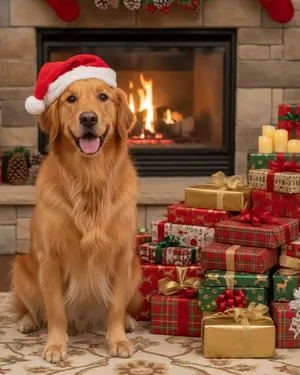
11. Dog by the fireplace
Keep my dog exactly as it looks in the photo, same markings and face. Put a small red Santa hat on its head and sit it next to a pile of wrapped gifts by a fireplace. Realistic photo, warm light.
Pets keep their markings better than people keep their faces.
12. Cat in the tree
Keep my cat's look and markings. Show it peeking out from the branches of a decorated Christmas tree, one ornament swinging near its paw. Realistic, playful, vertical.
For the family whose cat really does climb the tree.
13. Christmas morning chaos
Keep everyone's faces from my photo. Show us on Christmas morning surrounded by torn wrapping paper, the dog wearing a bow, everyone in pajamas mid-laugh. Realistic candid photo.
Funny cards get pinned to more fridges.
Elegant and painted
14. Oil portrait
Turn this family photo into a classic oil painting portrait with a dark green background, a garland and candlelight, the same faces and poses. Visible brushstrokes, gold-frame feel, vertical.
Looks good printed on matte card stock.
15. Black and white with one color
Keep the photo the same people and pose. Convert it to elegant black and white, except for the red ribbons and the red ornaments on a tree behind us. Soft studio light.
Simple, and almost never changes faces.
Want more? Our longer list of AI Christmas photo prompts has 30 more, grouped by card style.
Fixing faces (and hands, and extra relatives)
ChatGPT doesn't paste your face into a new background. It redraws the whole image, so every face is an interpretation. Usually close; sometimes your husband comes back looking like his brother. A few things help, in roughly this order:
- Edit only the broken part. Open the image, choose Select, brush over the face that went wrong, and type "match this face to the person in the original photo." Only the highlighted area is redrawn.
- Ask for less. New background and new sweaters, yes. New background, new clothes, new pose and a new art style in one prompt, no. Make it two steps.
- Name the problem. "The girl on the left is 8, not 12, and her hair was shoulder length" works better than "fix her."
- Count heads and fingers. Large groups sometimes gain or lose a person. Hands at the edge of the frame are the usual culprits for six fingers.
- Use a better original. If three tries fail, the source photo is probably too small, too dark or too angled.
Painted and vintage styles hide small differences, which is partly why the Norman Rockwell look spread so fast. If realistic keeps failing, switch prompt 14 or prompt 8 and call it a style choice.
Privacy: two settings to check first
Before uploading a photo of your kids, open Settings, Data Controls and look at "Improve the model for everyone." When it's off, new chats aren't used to train OpenAI's models. The other option is a Temporary Chat: it stays out of your history, doesn't touch ChatGPT's memory and isn't used for training, though OpenAI may keep a copy for up to 30 days for safety review. OpenAI's help pages don't set a separate rule for photos of minors, so the decision is yours. Cropping out school logos and house numbers is a good habit either way.
Getting the file ready for a printed card
A standard ChatGPT portrait is 1,024 x 1,536 pixels. That prints sharply at about 3.4 x 5.1 inches, which is smaller than a 5x7 card. Run it through a free 2x upscaler (2,048 x 3,072 pixels) and it comfortably covers a full 5x7 at 300 pixels per inch. ChatGPT's images also carry C2PA content credentials, invisible metadata that marks them as AI-made; card printers don't care about it.
Then build the card. Put the names and the greeting on in a card editor, never in the prompt, because spelled-out names are exactly what image models still get wrong. A ChatGPT photo in a 2:3 shape needs a little cropping for a 5:7 card, which is why the prompts ask for space above heads. For the next steps, see our guide to ordering photo Christmas cards and the explainer on free AI Christmas photo generators, which compares ChatGPT with Gemini, Copilot and the rest. And for the words inside, the Christmas card wording ideas page is a good place to start.
Short version: Attach a sharp photo with the + button, paste a prompt that pins every face before describing one Christmas scene, fix any bad face with the Select tool, then Save and upscale 2x for a 5x7 card. Free accounts can do it, within a limit OpenAI doesn't publish.
Frequently asked questions
How do you do the ChatGPT Christmas photo trend?
Open ChatGPT, tap the + button, choose Add photos & files, attach a clear photo, and paste a prompt that says to keep the same faces and describes the Christmas scene. When the image appears, open it and tap Save to download it.
Is the ChatGPT Christmas photo free?
Yes, free ChatGPT accounts can create and edit images, but OpenAI limits how many and does not publish a fixed number; you see a notice when you reach the limit. Plus and higher plans get more image generations (checked November 2026).
What model does ChatGPT use to make Christmas pictures?
In November 2026, ChatGPT makes images with ChatGPT Images 2.6, OpenAI's current image system, which is available on every plan including Free. The separate "Images with thinking" option is limited to Plus, Pro and Business plans.
How do I get ChatGPT to use my photo instead of inventing people?
Attach the photo first, then start the prompt with "Using the attached photo, keep every person's face, age, hair and expression exactly the same." Ask for one change at a time; asking for new clothes, a new place and a new pose in one go invites ChatGPT to redraw faces.
Can I fix just one face in a ChatGPT Christmas photo?
Yes. Open the image, choose Select, brush over the face or area that went wrong, and describe the fix, such as "match this face to the original photo." Only the highlighted area changes.
What was the ChatGPT Santa selfie Easter egg?
In December 2025, sending a wrapped-gift emoji in a new ChatGPT chat prompted users to share a selfie, and ChatGPT replied with a short AI video of Santa talking to them. It was a seasonal feature built on OpenAI's Sora video model, and OpenAI has not said whether it will return.
Is a ChatGPT photo big enough to print on a Christmas card?
A standard ChatGPT portrait is 1,024 x 1,536 pixels, which prints sharply at about 3.4 x 5.1 inches. For a full 5x7 card, upscale it 2x to about 2,048 x 3,072 pixels before you order.
Do these 15 prompts work in Gemini too?
Yes, the ChristmasCard prompts are plain descriptions with no ChatGPT-only commands, so they also work in Google Gemini, Microsoft Copilot and Meta AI. Results will look different in each tool.