
AI Christmas photo prompts: 30 ideas for your 2027 Christmas card
Updated November 20, 2026
Quick answer: Upload a clear photo to ChatGPT or the Gemini app, paste one of the 30 prompts below plus the "keep every face" line, and ask for a 4:5 or 2:3 portrait. Download the largest version you can get; a 5x7 card needs about 1500 x 2100 pixels for full 300 dpi print quality. Check hands, teeth and faces before you order cards.
Last December the feeds filled up with the same kind of picture: a normal phone photo turned into a glossy Christmas portrait by Gemini's Nano Banana or ChatGPT. It works for cards too, as long as the prompt describes a scene you'd actually want on the fridge, and as long as you check the result before 60 copies get printed.
These prompts are grouped by card style. Each one says what you'll get and gives one tip for the most common thing that goes wrong with it. We wrote them for this page; we haven't run every one against every tool, and these models change often, so treat them as starting points and edit the details (colors, room, number of people) to match your family.
- Family (4 prompts)
- Couples (4 prompts)
- Kids (4 prompts)
- Pets (4 prompts)
- Solo portraits (4 prompts)
- Funny (4 prompts)
- Vintage (3 prompts)
- Elegant (3 prompts)
How to use a prompt
- Pick your best photo: faces sharp, eyes open, nobody tiny in the background. Even daylight beats flash.
- In ChatGPT or the Gemini app, attach the photo, then paste the prompt and add the line below.
- Ask for a vertical 4:5 or 2:3 image so it fits a portrait card with little cropping.
- Regenerate two or three times. The first try is rarely the keeper.
- Fix small problems with a follow-up message instead of starting over.
Add this line to every prompt:
Keep every face exactly as in my photo: same features, skin tone, hair, age and expression. Do not add or remove people.
Family Christmas photo prompts
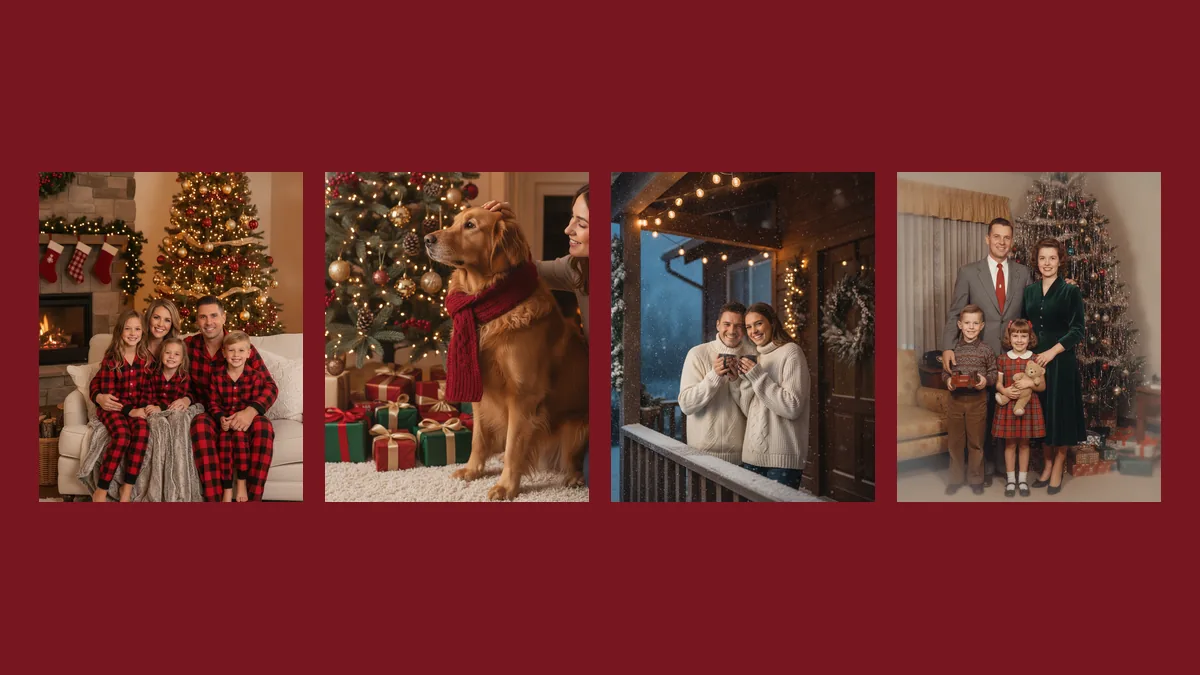
For the card that goes to everyone on the list. Upload one photo where every face is clear and similar in size.
1. Put this family in matching red and black buffalo plaid pajamas, sitting close together on a cream sofa in front of a tall lit Christmas tree, a fireplace with stockings to the left, warm evening light, sharp focus, 4:5 portrait.
2. Place this family outdoors at a snowy Christmas tree farm at golden hour, everyone in winter coats and knit hats, one fresh-cut tree beside them, soft falling snow, natural candid smiles.
3. Show this family decorating a Christmas tree in a bright living room, mid-laugh, one child on a parent's shoulders placing the star, ornaments in hands, soft window light, candid documentary style.
4. Recreate this family photo as a formal studio holiday portrait: dark green backdrop, soft key light from the left, everyone in coordinated burgundy and cream, posed in two rows, photographic, not illustrated.
Couples Christmas photo prompts
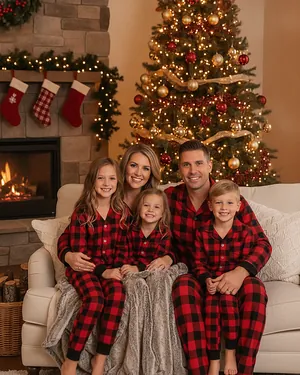
For first Christmases, engagements and a card from the two of you.
5. Put this couple on a snowy cabin porch at blue hour under warm string lights, both in cream cable-knit sweaters, holding mugs of cocoa, leaning in close, cinematic but realistic.
6. Show this couple kissing under mistletoe in a doorway decorated with garland and white lights, side view, soft background blur, warm tones.
7. Place this couple ice skating hand in hand on an outdoor rink at night with a giant lit Christmas tree behind them, motion in the scarves, crisp night air feel.
8. Turn this photo into an engagement announcement Christmas photo: the couple in front of a lit tree, her left hand on his chest showing the ring, champagne glasses on a side table, elegant warm light.
Kids Christmas photo prompts
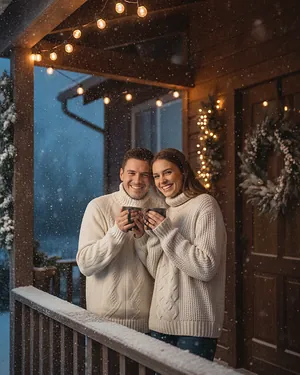
Use the clearest photo you have; small faces in group shots change the most. Read the privacy section below before uploading.
9. Put these children in green velvet holiday outfits peeking around a huge present with a red bow beside a lit Christmas tree, soft morning window light, joyful, photographic.
10. Show this child asleep on the sofa under a plaid blanket on Christmas Eve, a plate of cookies and a glass of milk on the table, the tree glowing behind, quiet and warm.
11. Place these kids in a snowy backyard building a snowman, rosy cheeks, mittens and bobble hats, snow falling, bright overcast daylight, candid.
12. Make this child look like a little elf helper in a cozy workshop: green felt outfit, pointed hat, small wooden toys on a workbench, warm lamp light, storybook but photographic.
Pets Christmas photo prompts
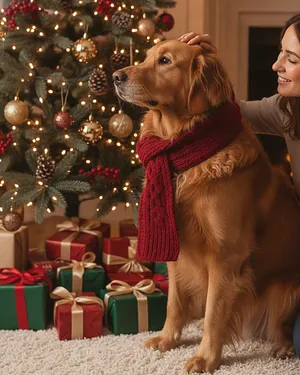
Pets are forgiving subjects: nobody notices a slightly different whisker.
13. Put this dog in a red knit scarf sitting beside a decorated Christmas tree with wrapped presents, head tilted, sharp fur detail, warm indoor light, eye level with the dog.
14. Show this cat curled up inside an open gift box lined with tissue paper under the tree, a bow on its head, soft lights in the background.
15. Place this family and their dog together by the fireplace, the dog in front wearing reindeer antlers, everyone looking at the camera, cozy and bright.
16. Put this dog in a tiny Santa hat sitting in a vintage red wagon full of presents on a snowy street, falling snow, shallow depth of field.
Solo portraits Christmas photo prompts
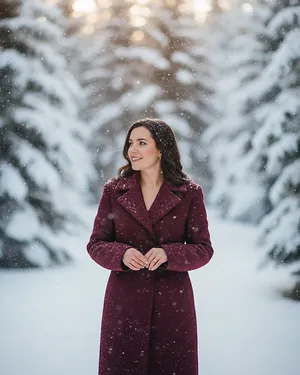
For a single-person card, a holiday profile photo or a card for friends.
17. Place me in a snowy evergreen forest wearing a long burgundy wool coat, soft falling snow, cinematic shallow depth of field, looking slightly off camera, natural skin.
18. Show me reading by a window on Christmas Eve, oversized cream sweater, mug of tea, fairy lights reflecting in the glass, snow outside, calm and warm.
19. Put me in a festive city street at night with shop windows decorated for Christmas, holding shopping bags, wearing a camel coat and red scarf, candid street-photo style.
20. Create a studio holiday portrait of me in a black turtleneck against a deep red backdrop with a single sprig of holly, Rembrandt lighting, sharp and minimal.
Funny Christmas photo prompts
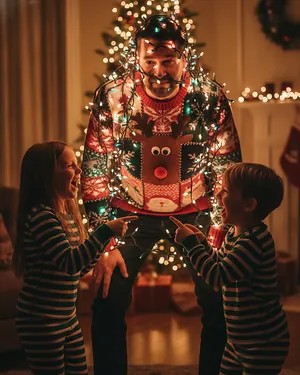
The best funny cards are a little bit true. Exaggerate something your family actually does.
21. Show this family in the most over-the-top ugly Christmas sweaters imaginable, blinking lights and pom-poms, posing very seriously like a 1980s studio portrait.
22. Put this dad tangled in a long string of Christmas lights on a ladder outside the house while the rest of the family watches from the porch with cocoa, comedic, photographic.
23. Make the family dog the star: dressed as Santa in a big armchair, the family kneeling around it holding wish lists, dramatic lighting.
24. Show this family in a chaotic Christmas morning: wrapping paper everywhere, the cat inside a box, a toddler wearing a bow, parents with coffee and tired smiles, candid.
Vintage Christmas photo prompts
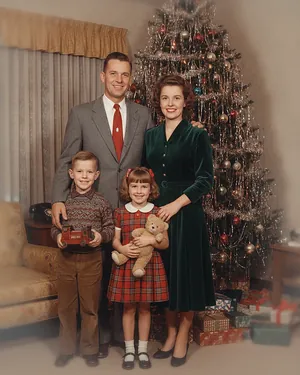
Old-photo styles hide AI flaws well: grain and soft color forgive a lot.
25. Turn this family photo into a 1950s slide-film style Christmas portrait in a living room with a silver tinsel tree, period clothes, warm faded colors and film grain.
26. Make this a 1970s Christmas photo: wood-paneled den, big-bulb colored lights, orange and brown sweaters, flash photography, slightly washed-out print look.
27. Recreate this photo as a Victorian Christmas portrait, sepia tone, family in period dress beside a candle-lit tree, formal pose, studio backdrop.
Elegant Christmas photo prompts
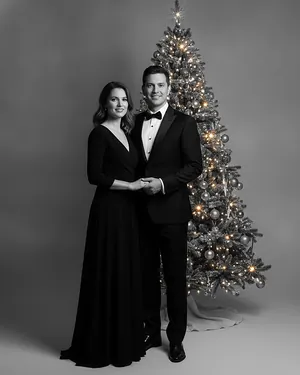
For a formal card, a business-leaning card, or anyone who prefers less red and green.
28. Black and white studio portrait of this couple in formal black attire, standing beside a softly lit Christmas tree that is the only gold-colored element, timeless and minimal.
29. Place this family in a grand staircase hall decorated with white flowers, garland and candles, everyone in ivory and navy, soft daylight, editorial style.
30. Show me in a dark green velvet dress (or suit) seated by a window with frost on the glass, one candle lit, low warm light, painterly but photographic.
Before you upload your kids' photos
On personal accounts, both ChatGPT and Gemini may use what you upload to improve their models unless you switch it off. In ChatGPT that's Settings, Data Controls, "Improve the model for everyone." In Gemini, turn off Keep Activity (Gemini Apps Activity), or the narrower setting for training on chat content where your account has it. Both changes apply to new chats only; they don't pull back photos you've already sent (settings checked November 2026).
Beyond that: crop out school logos, house numbers and anything with a name on it, and don't post the "before" photo next to the "after" with your child's full name. If a co-parent or the other family in the picture would mind, ask first.
Fixing hands, faces and other AI mistakes
Look at the result at full size, not as a thumbnail. Count fingers. Check teeth (AI likes to add a few), earrings that don't match, glasses that merged into skin, and the edge where hair meets the background.
- ChatGPT has a select tool: open the image, highlight just the bad hand or face, and describe the fix ("natural relaxed hand, five fingers"). The edit can spill a little outside your selection.
- In Gemini, describe the area in a follow-up message: "Fix the left child's right hand; change nothing else."
- If a face no longer looks like the person, go back to the original photo and try again with a simpler scene. Fewer props, larger faces.
- Still broken after three tries? Change the pose (hands in pockets, holding a mug) or crop. A tight crop hides a lot.
Size and resolution for printing a 5x7 card
| Image size | At 5x7 inches | Print result |
|---|---|---|
| 1500 x 2100 px or more | 300 dpi | Full photo quality |
| 1024 x 1536 px (a common ChatGPT portrait size) | About 205 dpi | Fine at arm's length, softer up close |
| Under 1000 px on the short side | Under 200 dpi | Visibly soft; use for a digital card instead |
Gemini's Nano Banana Pro can output up to 4K, which clears the bar easily. A 2:3 image is a little taller than 5:7, so the card editor trims a strip off the top or bottom; keep heads away from the edges. Our guide to Christmas card resolution for printing explains dpi in more detail, and when the photo is ready, photo Christmas cards compares where to print it.
Want the photo to sit inside a decorated border? The Christmas photo card frames have a ready-made photo window. Need words for the back? Browse our captions for Christmas photos.
Frequently asked questions
What is the AI Christmas photo trend?
It is the 2025 social media trend of uploading a selfie, family or pet photo to an image tool such as Gemini (Nano Banana) or ChatGPT with a detailed prompt that turns it into a Christmas portrait. Popular results were pajama scenes by the tree, snowy outdoor shots and candy-cane studio portraits.
Which AI tool should I use to make a Christmas card photo?
ChatGPT and the Gemini app both edit an uploaded photo from a text prompt, and free accounts on both can do it with a usage limit that neither company publishes as a fixed number. Gemini's Nano Banana Pro can output up to 4K, which helps when you print.
How do I keep my face the same in an AI Christmas photo?
Start from a sharp, well-lit photo where the face is large, add a line telling the tool to keep every face exactly as in the photo, and keep the scene simple. Uploading an extra close-up of each person also helps.
Is it safe to upload my children's photos to an AI image tool?
It depends on the tool's settings: by default, ChatGPT and Gemini consumer accounts may use uploads to improve their models. Turn that off first (ChatGPT: Settings, Data Controls, Improve the model for everyone; Gemini: Keep Activity off) and use photos without school logos, house numbers or name tags.
How do I fix weird hands or teeth in an AI Christmas photo?
In ChatGPT, open the image, use the select tool to highlight the hand and ask for a natural hand with five fingers; in Gemini, ask for the fix in a follow-up message. If it keeps failing, crop the hands out or ask for a pose with hands in pockets.
What resolution do I need to print an AI photo on a 5x7 card?
1500 x 2100 pixels gives a full 300 dpi on a 5x7 card. A 1024 x 1536 image prints at about 205 dpi at that size, which looks fine at arm's length but softer than a camera photo.
Can I order printed photo cards with an AI-generated picture?
Yes, card printers accept AI images like any other JPG, as long as the file is large enough for the card size. Upload it, add your greeting in the card editor, and check the preview for crop.
Should I say my Christmas card photo was made with AI?
A small line such as "photo made with AI from our real photo" is a kind choice when people could think the scene really happened. Gemini and ChatGPT images also carry hidden markers (SynthID or C2PA data) that some apps can detect.