
Christmas filters for family video calls and card photos (2027)
Quick answer: For a Christmas video call with family, the effects live in each app's video menu: Video Filter in Zoom, Apply visual effects in Google Meet, Video effects and settings in Teams, the effects icon in WhatsApp, and gesture reactions in FaceTime. For a photo you plan to print on a card, skip in-app filters (they save at roughly 1080 x 1920 pixels) and add the festive touches in an editor afterward.

Video call apps: where the effects are
Christmas Day calls with grandparents, cousins in another time zone, the aunt who can't travel this year. Almost every call app now has some kind of effects menu. Very few have anything labeled "Christmas", so the trick is knowing what's there and bringing your own festive background.
| App | Where to find effects | What you can do |
|---|---|---|
| Zoom (desktop) | Arrow next to Stop Video, then Choose Video Filter or Choose Virtual Background | Frames and color filters, avatars, Studio Effects (eyebrows, facial hair, lip color), upload any image or video as a background |
| Google Meet | Apply visual effects on the self-view before joining, or More options during the call | Backgrounds (blur, built-in, upload), filters, styles; some options depend on device and account |
| Microsoft Teams | Video effects and settings on the join screen, or More during a meeting | Blur, backgrounds, upload your own image where allowed, some video filters |
| FaceTime (iPhone) | Gestures, or touch and hold your own tile; Effects for Memoji | Fireworks, confetti, balloons, hearts and more; Memoji; Portrait blur |
| Effects icon at the top right during a video call | 10 filters (Warm, Vintage TV, Frosted Glass and others) and 10 backgrounds including Celebration | |
| Messenger | Smiley-face effects icon during a video call | Face effects, masks and filters; the seasonal selection changes |
Menu names checked November 2026 against each app's help pages and recent guides. Labels move around between app updates, so if a button isn't exactly where we say, look for the arrow next to the camera icon or a sparkle or smiley icon near your own video.
Zoom
Zoom has the deepest effects menu of the call apps. Click the small arrow beside Stop Video and you'll see Choose Video Filter (frames, color tints, little hats and props) and Choose Virtual Background. The background option is the useful one at Christmas: click the plus sign, upload a photo of your own tree or last year's family card, and you're sitting in front of it. Avatars, in the same panel, turn you into an animated character, which small kids find very funny for about four minutes.
Google Meet and Microsoft Teams
Both treat effects as a panel you open before joining. In Meet it's Apply visual effects on your self-view; in Teams it's Video effects and settings on the pre-join screen. Each has blur, built-in backgrounds and an upload button. Work and school accounts sometimes switch uploads off, which is why a grandparent on a library computer may only see the stock backgrounds. On phones, both apps offer fewer effects than in a desktop browser.
FaceTime
FaceTime reactions arrived with iOS 17, and Apple says the hand-gesture version needs an iPhone 12 or later. Two thumbs up sets off fireworks across your video. Two peace signs make confetti; a heart made with both hands floats hearts. None of it is Christmas-specific. Kids still love it, and it's a good party trick for the grandparent who thinks they "don't do technology". If the effects keep going off by accident while you gesture at the dinner table, swipe into Control Center during the call and turn Reactions off.
WhatsApp added video call filters and backgrounds in October 2024: 10 of each, opened from the effects icon in the top corner during a call. Nothing is labeled Christmas, but Warm plus the Celebration background gets close, and it works in group calls. For a lot of families abroad, WhatsApp is the Christmas call app, so it's worth showing everyone where the button is before the 25th.
Snapchat, TikTok and Instagram for festive selfies
If what you want is a Santa beard, reindeer antlers or falling snow on your face, the social camera apps are still where those live.
- Snapchat has the biggest seasonal selection. Search Lenses for "Christmas", "Santa", "reindeer" or "snow". Lenses come from Snap and from creators using Snap's Lens Studio, which is still open.
- TikTok has effects you can search in the camera. Creators publish them through Effect House, which is also still open to the public in 2026.
- Instagram changed the most. Meta closed Meta Spark, the tool outside creators used to make Instagram effects, on January 14, 2025, and those effects vanished from the app. What's left are effects made by Meta and the normal photo filters in the editor. If a filter you used every December has gone, that's why.
Kids and face filters: many lenses track and reshape faces, and the selfies tend to get shared. Use them on your own phone with the kids next to you, and think twice before posting a filtered photo of someone else's child.
Filters and Christmas card photos: the resolution problem
This is the part most people find out at the print counter. Photos taken inside a social app's camera with a lens or effect are usually saved around 1080 x 1920 pixels, about 2 megapixels. Your phone's own camera saves 12 megapixels or more. A flat 5 x 7 card printed at 300 dpi wants 1500 x 2100 pixels.
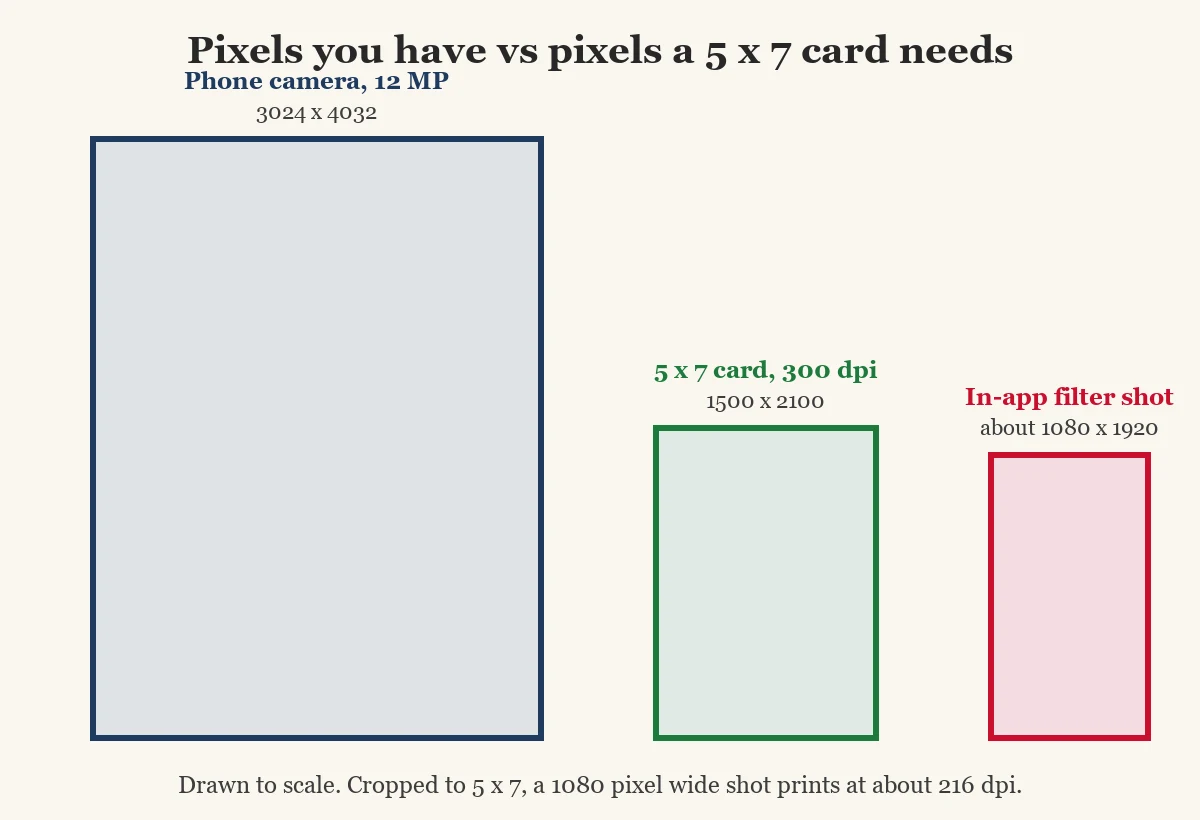
Crop that 1080 x 1920 filter shot to 5 x 7 and you have 1080 x 1512 pixels, which prints at about 216 dpi. That's below the usual 300 dpi target but above the 200 dpi most printers treat as the floor, so it can work as a smaller photo inside a card layout. Zoom in to crop a single face, though, and it falls apart quickly. Screenshots of a video call are worse: each person's tile might only be a few hundred pixels wide.
The fix is simple, if a bit less spontaneous:
- Take the photo with the phone's normal camera app, no filter.
- Add the festive bits afterward in an editor: a Santa hat sticker, snow, a frame, a warm color grade. Our online Christmas photo editor guide covers the free options, and adding snow to a photo is one edit that looks far better done afterward than live.
- Keep the unedited original. If the card printer flags the file, you can redo the edit on the full-size photo.
- Check the final file size in pixels before you upload. Our page on Christmas card resolution for printing lists what each card size needs.
Want antlers specifically? AI reindeer antler photo filters work on a full-size photo after it's taken, which keeps the detail a live lens throws away. For a ready-made border around the photo, the free Christmas photo card frames drop over a full-resolution picture.
Use the call itself as a card
The family video call screenshot (everyone in Santa hats, Grandpa's camera pointed at the ceiling) won't print well on a 5 x 7, but it makes a great digital card. Send it the next morning as an ecard or a photo message with a line like "Same time next year?". Our roundup of free Christmas ecards includes services that let you upload your own picture.
And if you want one printed keepsake from the call, take a real photo of your end of it: phone camera, the laptop on the table, the tree behind. That photo has all the pixels a card needs, and it tells the story of a long-distance Christmas better than the screenshot does.
Make your own Christmas filter
Making a family effect (your dog's face on a reindeer, a custom snow globe) is possible in 2026 on two platforms: Snap's Lens Studio for Snapchat and TikTok's Effect House for TikTok. Both are free to download and have templates, so a simple face-tracked hat is an afternoon's project, not a programming course. Instagram is not an option any more; with Meta Spark gone, there's no public way to publish your own Instagram effect. For a card, a plain edited photo is still the better route.
Frequently asked questions
How do I get a Christmas filter on Zoom?
In a Zoom meeting, click the arrow next to Stop Video and choose Video Filter for frames and color effects, or Choose Virtual Background to upload your own Christmas picture. Zoom does not promise a Christmas-specific filter each year, so uploading a festive background is the reliable option.
Can you use effects on a FaceTime call?
Yes. On iOS 17 or later, iPhone 12 and newer models can trigger reactions with hand gestures, such as two thumbs up for fireworks or two peace signs for confetti, and any FaceTime caller can tap Effects to use a Memoji. None of these are Christmas-themed, but fireworks at midnight on New Year's Eve land well.
Does WhatsApp have filters for video calls?
Yes, since October 2024 WhatsApp has had 10 video call filters and 10 backgrounds, opened from the effects icon during a call. The Celebration background is the closest to festive; there is no confirmed Christmas-only option.
Why are there fewer Christmas filters on Instagram now?
Meta shut down Meta Spark, the tool outside creators used to publish Instagram effects, on January 14, 2025, and those effects disappeared from the app. Instagram now only carries effects made by Meta plus its regular photo filters.
Can I print a photo taken with a Snapchat lens?
You can, but it will usually be around 1080 x 1920 pixels, which prints a 5 x 7 at about 216 dpi after cropping. That is fine for a small photo on a busy card layout and soft for a full-bleed card, where 1500 x 2100 pixels is the usual target.
How do I add a Christmas background in Google Meet?
Before you join, click Apply visual effects on your self-view (or during the call, open More options and choose Apply visual effects), then pick Backgrounds and upload a Christmas photo. Some work or school accounts block uploads, in which case only the built-in backgrounds appear.
What is the best way to get a festive photo for a printed Christmas card?
Take the photo with your phone's normal camera, then add hats, snow, frames or text in an editor afterward. You keep the full 12 MP or more of detail and can always go back to the unedited original.
Where can I check if my card photo is big enough to print?
The ChristmasCard guide to Christmas card resolution lists the pixel sizes needed for each common card size and how to check them on a phone.