Best Christmas apps 2027: cards, Santa, countdowns and games
Last updated November 25, 2026. This page links to our own guides for the details, and sorts the season's apps by the job they do.
Quick answer: There is no single best Christmas app, because December is a list of jobs. For 2027, use a card maker for your cards, a list or label tool for the envelopes, a Santa hotline or letter template for the kids, a countdown for the wait, NORAD Tracks Santa for Christmas Eve, and Santa Workshop: Christmas Game for everything in between.

Santa Workshop: Christmas Game
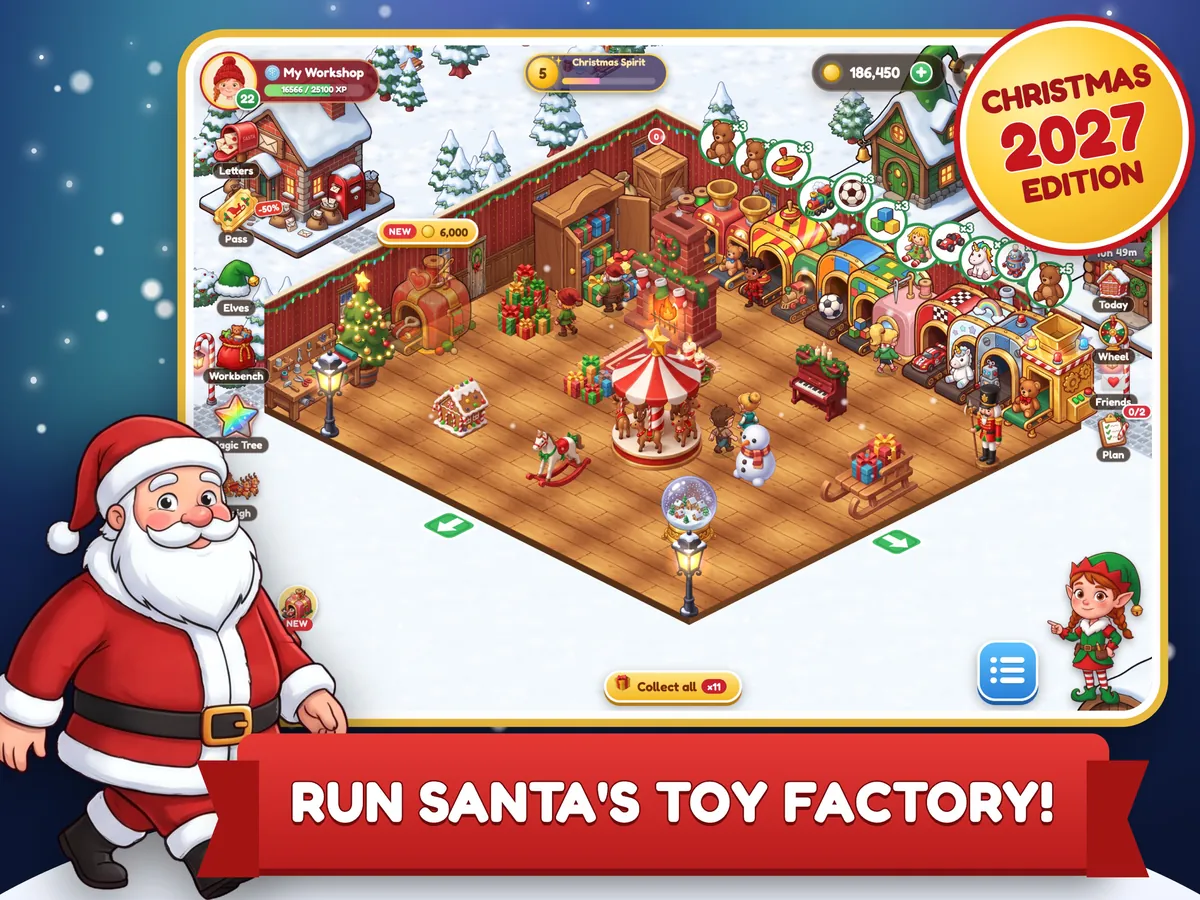
Run Santa's toy factory, hire elves, answer children's letters, feed the reindeer and load the sleigh, then switch to Christmas match 3 or a merge board. Free, works offline, no account.
Download on the App Store Get it on Google PlayGoogle Play: rated Everyone, contains ads. Optional in-app purchases.
Search for Christmas apps and you mostly get wallpapers and games. That is a narrow view of the season. Most of the stress in December comes from a handful of tasks: sending cards that arrive on time, keeping an address list straight, keeping children excited without an extra screen hour, and finding something to do in a waiting room. This guide groups apps by task, and for each task points to the page on this site that covers it properly.
Christmas apps by what you are doing
| You are... | Look for | Our guide |
|---|---|---|
| Making a card | A card maker with templates, photo placement and print-ready export | Best Christmas card apps |
| Starting from one photo | An AI card maker, with a manual check of the finished artwork | AI Christmas card makers |
| Sending to a long list | Contact import, duplicate removal and label printing | Address label apps |
| Writing the family letter | A letter template with space for photos | Christmas letter templates |
| Helping a child reach Santa | A recorded hotline, a letter template or a paid call service | Call Santa |
| Counting down | A live countdown, plus an Advent calendar if you like one | Days until Christmas |
| Passing the time | An offline Christmas game with short sessions | Christmas game apps |
Apps for making and sending Christmas cards
Cards are what this site is about, so start here. A good Christmas card app does four things: it gives you a layout that suits a photo, lets you edit the greeting, exports at a size a printer accepts, and tells you what is free before you finish. The mistakes we see most are designing a card in a free plan and discovering at export that a font or sticker is paid, and printing a photo that looked sharp on a phone but was too small for the card.
Our guide to the best Christmas card apps names Canva as the best general choice for most people, for its templates, drag-and-drop editor and export options. It also covers YouCam Perfect for photo-first cards, Adobe Express for custom digital designs, Shutterfly and Snapfish when you want to design and order printed cards in one place, and seasonal apps including Christmas Pictures App: PiXmas. Prices, plans and templates change, so treat each as something to confirm on the day.
If you want to start from a single picture, read the guide to AI Christmas card makers. The practical advice there applies to any generator: add the greeting with a normal text tool instead of letting the AI draw the words, zoom in on faces and hands, and export one proof before ordering. Our photo Christmas cards page, the printable Christmas card maker page and the last-minute card maker page cover the same ground for people with different deadlines, and the PiXmas review is our editorial take on the one-photo app featured on the homepage.
If you would rather not print at all, free Christmas ecards compares eight ecard sites on what is free to send, and the animated Christmas card apps and video card makers suit families who share on a screen. For the words, Christmas card wording ideas and our Merry Christmas wishes give you a start so you are not staring at a blank text box.
Apps for your card list, address labels and Christmas letter
The least glamorous Christmas apps save the most evenings. If you send more than about twenty cards, a mailing list in your head stops working. The Christmas card list management apps guide compares tools for collecting addresses, tracking recipients and removing duplicates, and the address label apps guide covers importing contacts and printing labels. Do this part in early November, because a clean list is the one thing you cannot fix on the night before the post office deadline.
Keep timing in mind as well. Our Christmas card mailing timeline and the printing and mailing hub are the places to check dates, and Christmas card address privacy is worth a read before you upload a list of friends' addresses to any service.
The yearly family letter has its own tools. Christmas letter template apps compares Canva, Word, Pages, Adobe Express, Google Docs and PiXmas for the job. If you want a file rather than an app, our Christmas letter templates page has three free printable family letters as PNG or PDF, with sample text and writing tips.
Santa apps: calls, letters and photos
Santa apps fall into three groups, and they differ in cost and in what you give away. Calls first. The free hotlines are recordings with a voicemail, live conversations are paid, and our Call Santa page lists what we found, with prices and safety tips for parents. Read it before you hand a phone to a child, and be wary of any service that asks for a child's details.
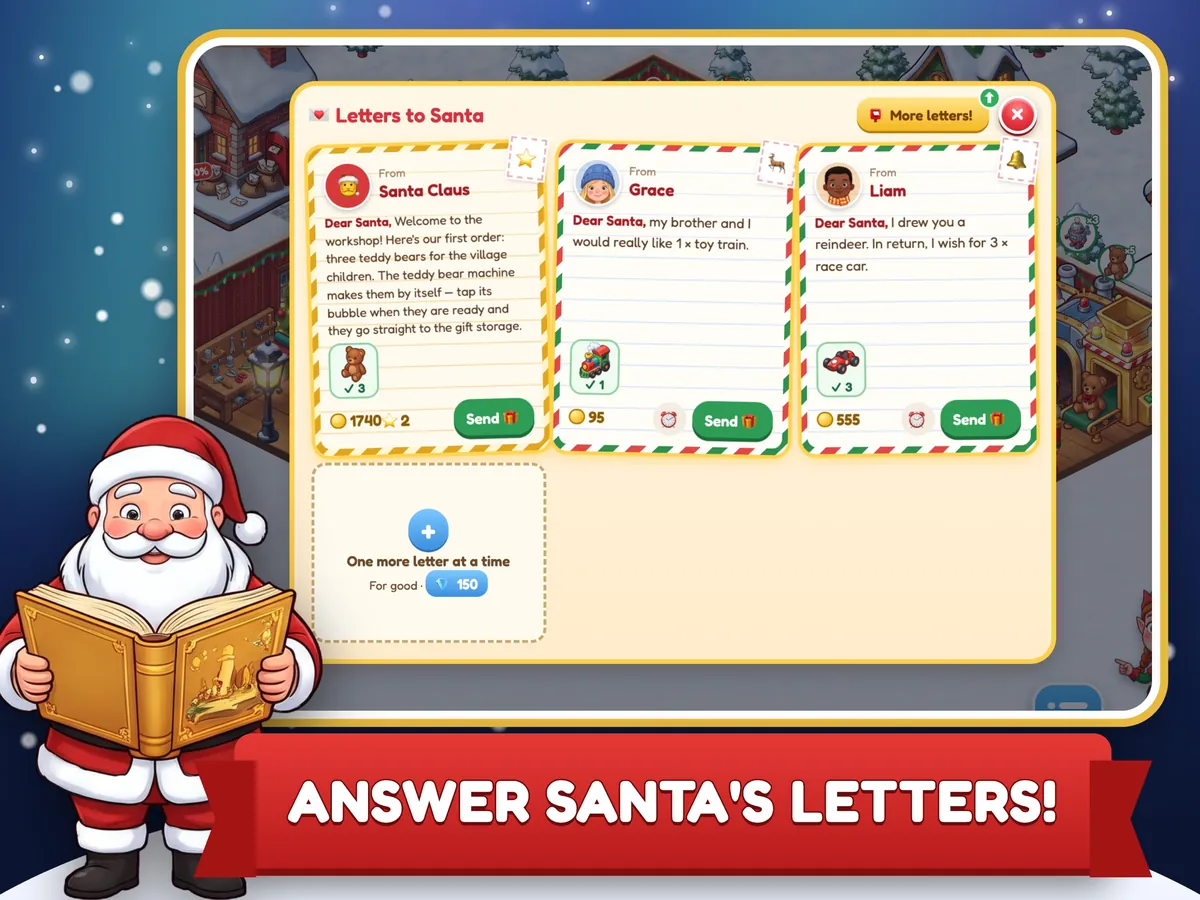
Letters are the cheapest option and the one children remember. Our letter to Santa template has four free printable versions, including fill-in-the-blank, lined and wish list styles, plus a letter-from-Santa reply. A written letter also gives a shy child a script for a phone call. Inside a game, the idea shows up in another form: Santa Workshop has children's letters that ask for specific toys, which you answer by making and delivering them.
Photos are the third group. Putting Santa, or an elf, into a picture is a staple of holiday sharing; see AI Santa photo generator apps, Elf Yourself alternatives and our guide to adding Santa to a photo. Photos of children are personal data, so our child photo safety page is worth a look before uploading.
For the photo itself, our pick is PiXmas, a Christmas photo app for iPhone: upload a photo, choose a style from about 20 collections (Santa & Workshop, Family, Babies & Kids, Pets, New Year's Eve and more) and tap Generate. It can also frame a picture with a wreath, candy canes or a gold border, add a Santa hat or a background, and make wallpapers and card-ready pictures. Ideas for both are on PiXmas's Christmas photo frames guide, and our PiXmas review covers the app in detail.
Countdown and Advent apps
A countdown is the simplest Christmas app, and the one a child will check ten times a day. Our how many days until Christmas page shows a live countdown to December 25 in your local time zone, with card timing tips beside it. Put it on a home screen or leave it on a tablet in the kitchen.
Advent calendar apps add a small daily reward. We have not rated any, so we are not naming one. Check three things before you install any: whether the daily content is free or paid, whether it shows ads to a child, and whether it works offline. Santa Workshop has an Advent door of its own, which is one reason it also works as a countdown companion, but for a paper-and-chocolate calendar nothing on a phone replaces the real one.
Tracking Santa on Christmas Eve
The best-known Santa tracker is NORAD Tracks Santa, a long-running Christmas Eve tradition. Children can follow Santa's progress on a map, and NORAD's volunteers also answer a phone line on December 24; our Call Santa page has the number and what we could confirm about the hours. Google Santa Tracker was still online when we checked on November 20, 2026, though its old feature for sending a call from Santa is gone. Trackers go live close to the day and details change each year, so open the official page on December 23 to check what is running, rather than trusting a store listing from last year. We have not tested tracker apps, and we give no ratings for them here.
Christmas games, led by Santa Workshop
Games are the biggest group of Christmas apps by downloads, and the one where a good pick saves you from a pile of ad-heavy clones. Our top pick for 2027 is Santa Workshop: Christmas Game. It is a free toy factory game: you run Santa's workshop, hire elves to speed up the machines, answer children's letters, feed the reindeer and load the sleigh. There is also a Christmas match 3 mode, the Enchanted Tree, with hundreds of levels, and a merge board called Santa's Workbench.
What matters for a busy household: it is free, rated 4+ on the App Store and Everyone on Google Play, works offline, and needs no account. It shows ads and has optional in-app purchases, so check what your child can buy before handing over a phone. You can get the Christmas game for iPhone and iPad, or find it on Google Play as a Santa game for Android, and the developer's site covers the modes under Christmas game 2027.
For more choice, our best Christmas game apps guide compares six, and there are separate pages for match 3 games, Christmas puzzle games, games for adults, family games, party and phone games and Santa games. Not every game needs an app; Christmas games online covers the browser.
A simple Christmas app plan, week by week
Apps help most when you use them in order. This is the sequence we would follow.
- Early November: tidy the mailing list and decide on printed or digital cards. Open your list or label app first, and check the mailing timeline for your dates.
- Mid November: design the card, write the greeting and print a proof. Order copies only once the proof looks right at full size.
- Late November: print labels, write the family letter if you are sending one, and post anything going far away.
- December 1: start the countdown, and open the Advent calendar or the game's Advent door if you use them.
- Mid December: help children write to Santa, or set up a hotline call with a script on paper beside the phone.
- December 23 and 24: check the official Santa tracker page, charge the tablet, and install any game you want for the car before you leave, because store pages are slow on holiday wifi.
Last-minute? Our last-minute card maker page and the free ecards comparison are built for exactly that, and an ecard arrives faster than anything in an envelope.
How we chose what to include
This page is a map, not a ranking. We include categories that people search for in December, and where we have tested or read the apps we say so and link to the guide. Where we have not, as with Advent and tracker apps, we say that too and give a checklist instead of a name. ChristmasCard.io is an independent editorial site, with no affiliation with the card makers, trackers or game developers mentioned here. Santa Workshop is a free Christmas game from the same holiday family as this site, and we say so wherever it is the pick. Ratings, prices and features change, and each linked guide notes the date it was checked.
Frequently asked questions
What are the best Christmas apps?
It depends on the job. For cards, a card maker such as Canva suits most people; for Santa, a recorded hotline or a letter template; for tracking, NORAD Tracks Santa; for play, Santa Workshop: Christmas Game, which is free on iPhone, iPad and Android and works offline.
What is the best free Christmas app?
Santa Workshop: Christmas Game is free to download on iPhone, iPad and Android, with ads and optional in-app purchases. For cards, several editors have free plans, but premium templates and high-resolution exports can need a paid plan, so check before you design.
What Christmas apps should I download before December?
A card maker, an address or mailing-list app if you send more than a handful of cards, a Santa tracker for Christmas Eve, and one game for waiting rooms and travel. Download them early, because app-store pages and plans change late in the season.
Is there a Christmas app that makes cards from a photo?
Yes. Several card makers turn one phone photo into a printable or digital card; our guides to AI Christmas card makers and Christmas card apps compare them. Check the export format and print size before you order copies.
Which Christmas apps work offline?
Santa Workshop: Christmas Game works without a connection, apart from ads and purchases, so it suits flights and car trips. Card makers, trackers and Santa call services usually need a connection, so prepare cards and letters at home.
Are Christmas apps safe for kids?
Check the age rating, the ads and the purchase prompts on each store page. Santa Workshop: Christmas Game is rated 4+ on the App Store and Everyone on Google Play, and needs no account. For photo apps and Santa services, read the privacy policy before uploading a child's picture or name.
Verdict: Treat the Christmas apps you need as a short toolkit: a card maker, a list tool, a letter or hotline for Santa, a countdown and one game. Start with the card guides if you have a deadline, and install Santa Workshop for the days when you have ten minutes and nothing to do.